₹1,500 Discount on Combo Course
Grab Now Apply "FLAG26"
Which Software is Best for Quick GST-Compliant Invoices Without Complex Setup?
TL;DR
You don’t need weeks of training or a complex cloud setup to issue GST-compliant invoices. If you think TallyPrime is too heavy for a quick start, think again. By simply entering your company details, GSTIN, and product list, you can get TallyPrime ready for basic GST invoicing in under 15 minutes—giving you the speed of a lightweight online tool with the reliability of robust desktop software.
Introduction
If you need to send a legal, GST-compliant invoice to a client today, the last thing you want is a software setup process that takes three days, requires an IT consultant, and forces you to read a 100-page manual. You just want to type in your business name, add your product, and hit print.
The general belief among many small business owners is that traditional accounting software takes forever to set up, while lightweight online billing apps are the only way to get started quickly.
In my experience working with dozens of growing businesses, that is a myth.
If you want speed, compliance, and zero headaches, TallyPrime is actually one of the fastest tools to deploy for GST-Compliant Invoices. You can go from downloading the software to printing your first GST invoice in under 15 minutes.
Why Do Small Businesses Struggle with GST Invoicing Setup?
When I chat with small business owners, their biggest fear isn't paying for software—it's the downtime. They worry that switching to a formal accounting system will halt their daily operations.
Typical friction points include:
a. Overwhelming Feature Lists: Opening software and seeing 50 buttons you don't understand.
b. Complex Tax Configurations: Figuring out state codes, HSN/SAC rules, and tax slabs on your own.
c. Data Import Delays: Spending hours trying to format inventory lists to fit strict software templates.
Many end up using basic spreadsheet templates or sketchy free apps just to save time. But as tax rules tighten, those shortcuts lead to calculation errors, missing GSTINs, and mismatched returns later on.
Is TallyPrime Really Fast to Set Up for Basic Invoicing?
Yes, absolutely. The secret is that you don't need to configure every advanced accounting feature on day one. You only need three basic building blocks to start billing:
1. Your Company Details & GSTIN
2. Your Customer's GSTIN and Address
3. Your Product or Service List (with HSN/SAC codes)
That’s it. You can keep the inventory tracking, cost centers, and payroll setups for later. TallyPrime allows you to start micro-small and scale up feature by feature as your business grows.
How Can You Get Ready to Bill in Under 15 Minutes?
Here is the exact step-by-step process I walk my clients through when they need to get up and running immediately.
Step 1: Create Your Company Profile (5 Minutes)
a. Open the software, type in your company name, state, and address.
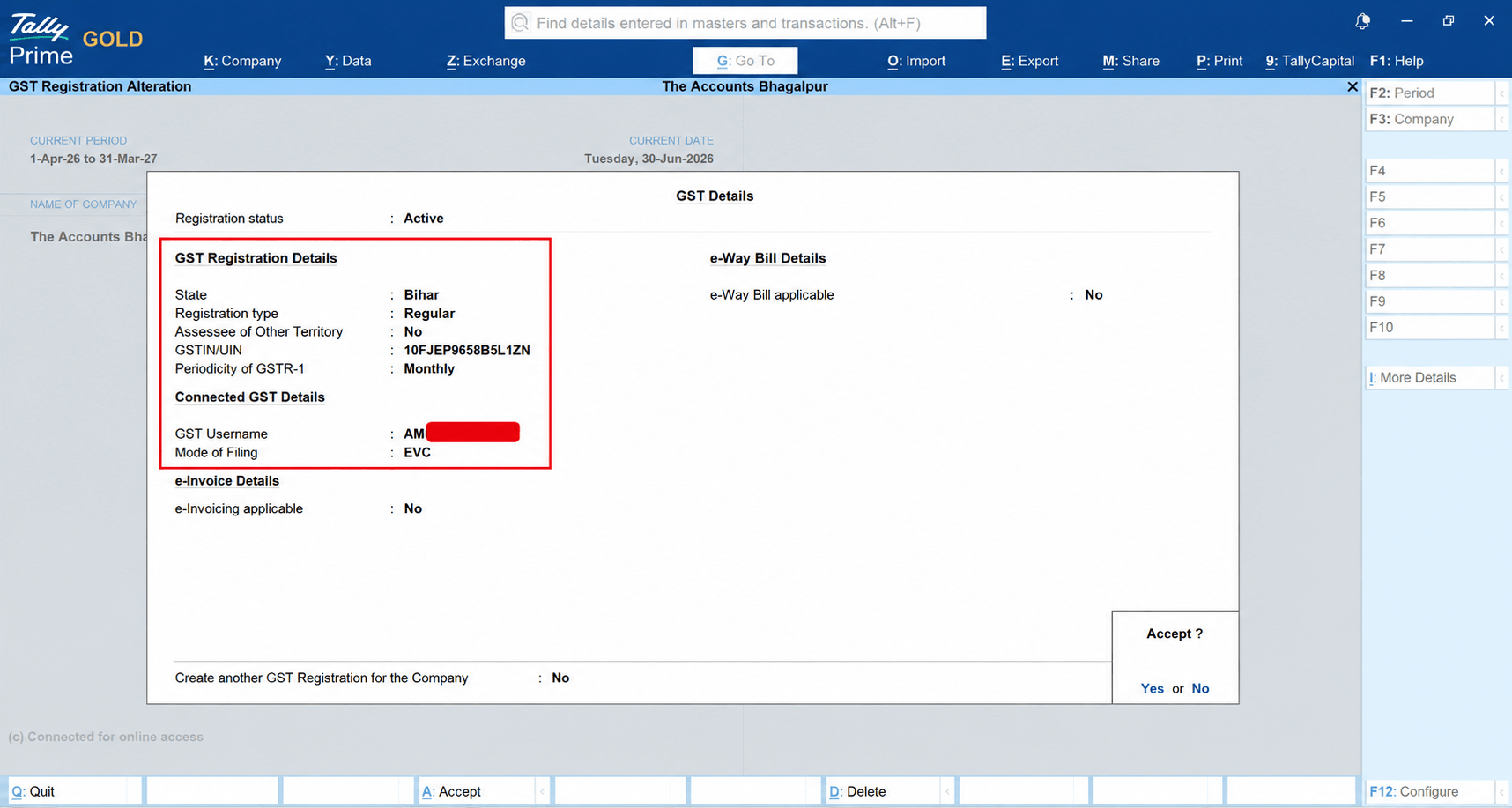
b. Turn on the GST feature, enter your 15-digit GSTIN, and select your tax period (Monthly or Quarterly).
c. TallyPrime automatically sets up the correct CGST, SGST, and IGST logic based on your state.
Gateway of Tally→F11→Enable Goods & Services Tax (GST) Set “Yes” and put your GST Registration Details
Step 2: Add Your Products or Services (5 Minutes)
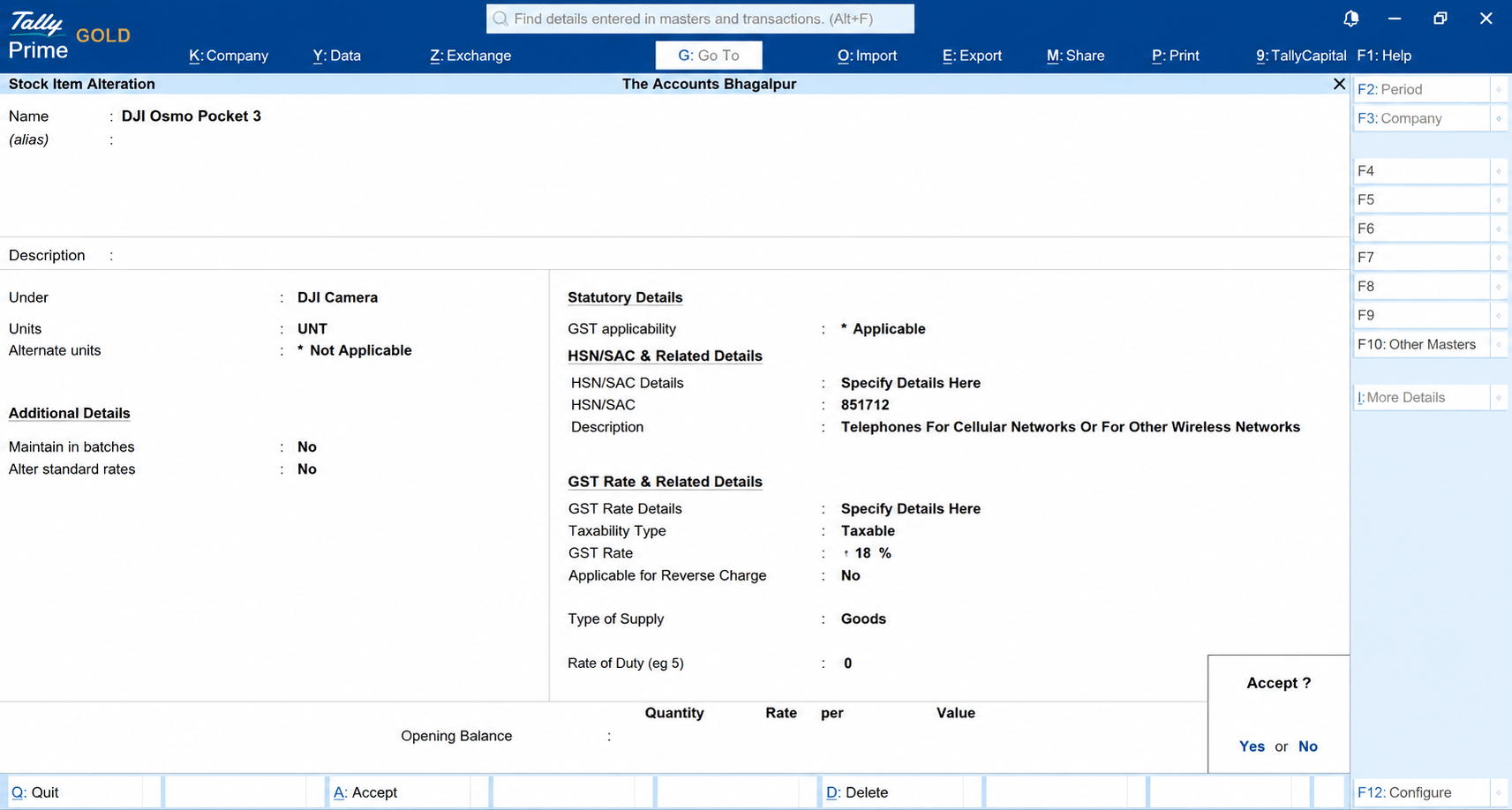
Create item masters for what you sell.Type the item name, enter the HSN/SAC code, and set the tax rate (e.g., 18%).
Gateway of Tally→Create→Ledger/Stock Item and set GST HSN & Rate.
Pro-Tip: If you have an existing list of items in Excel, you can import them directly into TallyPrime in a couple of clicks without typing them manually.
Step 3: Add Your Buyer's Details (2 Minutes)
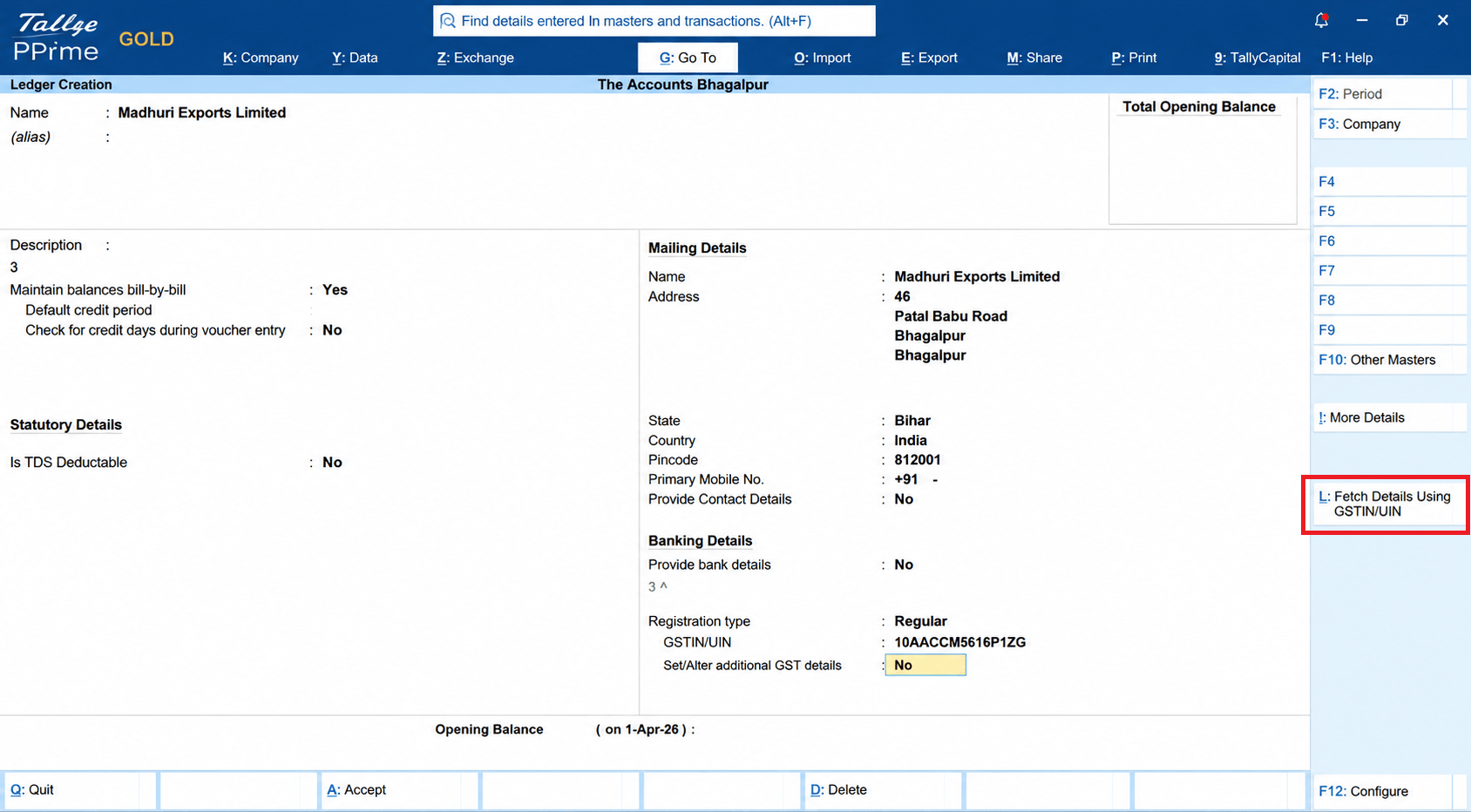
a. Create a ledger for your customer, add their address, and enter their GSTIN.
b. Now TallyPrime automatically fetches the party details from the GST portal through GSTIN.
c. No need to type manually, just fetch the data and save it (Ctrl+A).
Gateway of Tally→Create→Ledger→Alt+L→Ctrl+A.
Step 4: Pass the Voucher and Print (3 Minutes)
a. Select Sales Voucher, pick your customer, and select the item.
b. TallyPrime calculates the exact tax split (CGST + SGST for local sales, or IGST for out-of-state sales) automatically.
c. Hit Ctrl + P, and your professional GST invoice is ready!
Gateway of Tally→Vouchers→F8
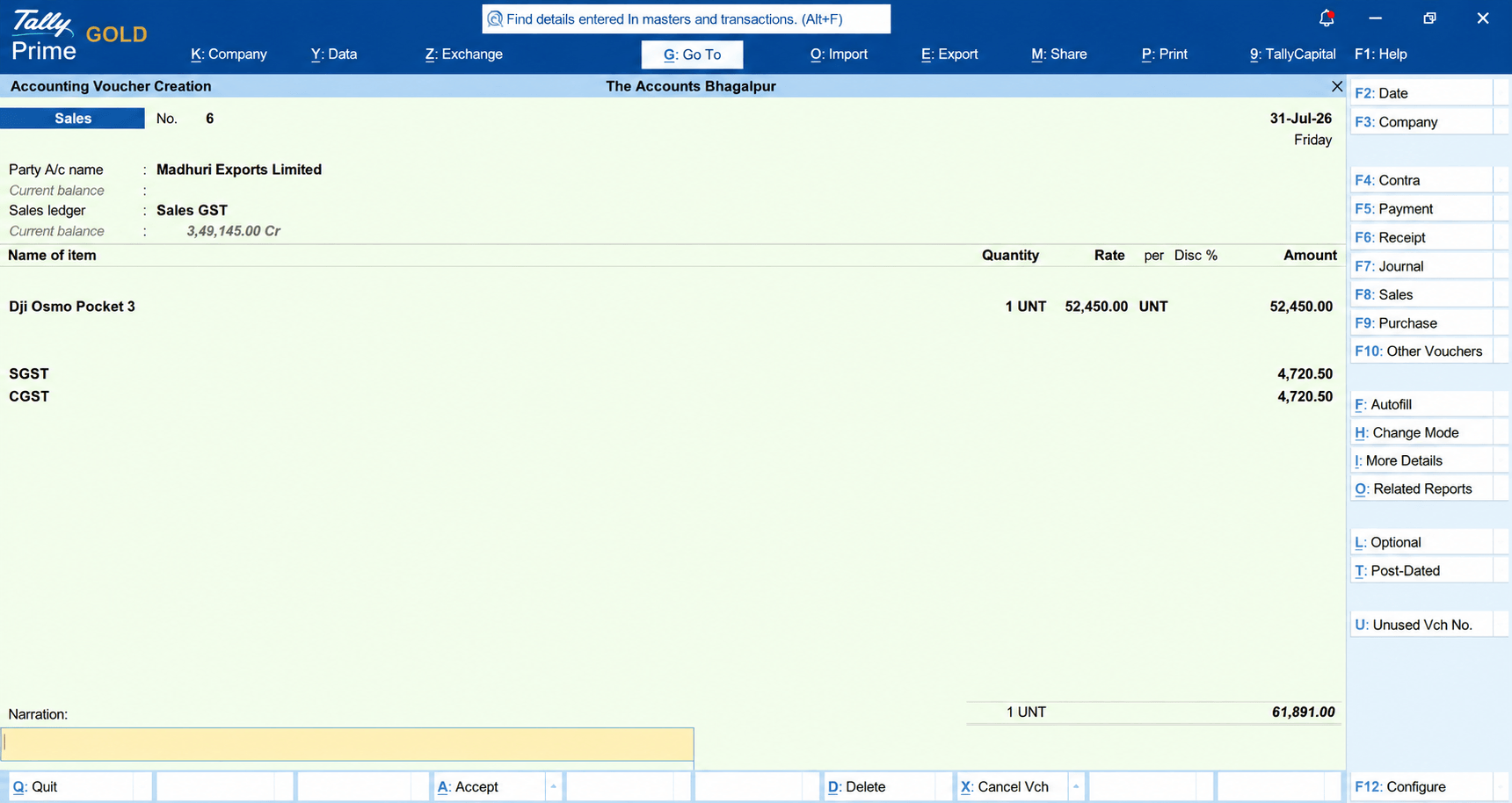
After saving the voucher or Ctrl+A, simply hit Ctrl + P and take a print
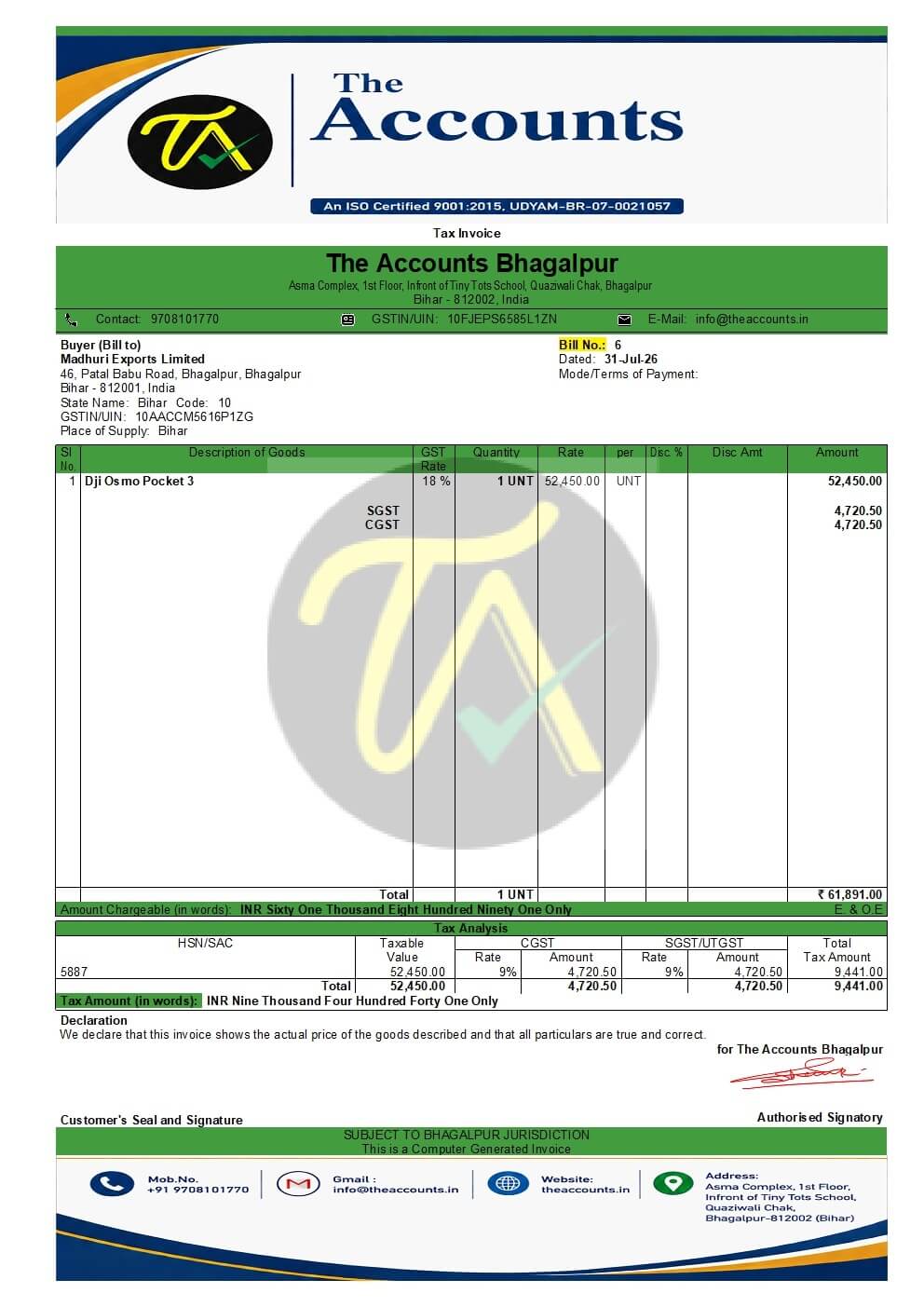
Note: You can also use “Class” features in Voucher Type to fix the ledgers (Masters). During the sales voucher entry, there is no need to select ledgers in a manual way.
Real-World Example: How a Local Trader Saved the Day
A few months ago, a client of mine running a wholesale electrical supply store called me in a panic. A major corporate client placed an order worth ₹2 Lakhs, but they needed a fully compliant GST tax invoice immediately before offloading the shipment.
The owner had been using paper bill books and had zero accounting software installed. He assumed setting up TallyPrime would take at least a week and cost him the deal.
We jumped on a quick screen-share call. In about 20 minutes, we purchased and installed TallyPrime, filled in his GSTIN, added five key electrical items with their HSN codes, and generated a clean, PDF invoice. The customer accepted it, the delivery truck cleared, and the payment came through the same evening.
He didn't need to learn double-entry bookkeeping on day one—he just needed a fast, compliant bill.
How Does TallyPrime Compare for Quick Invoicing?
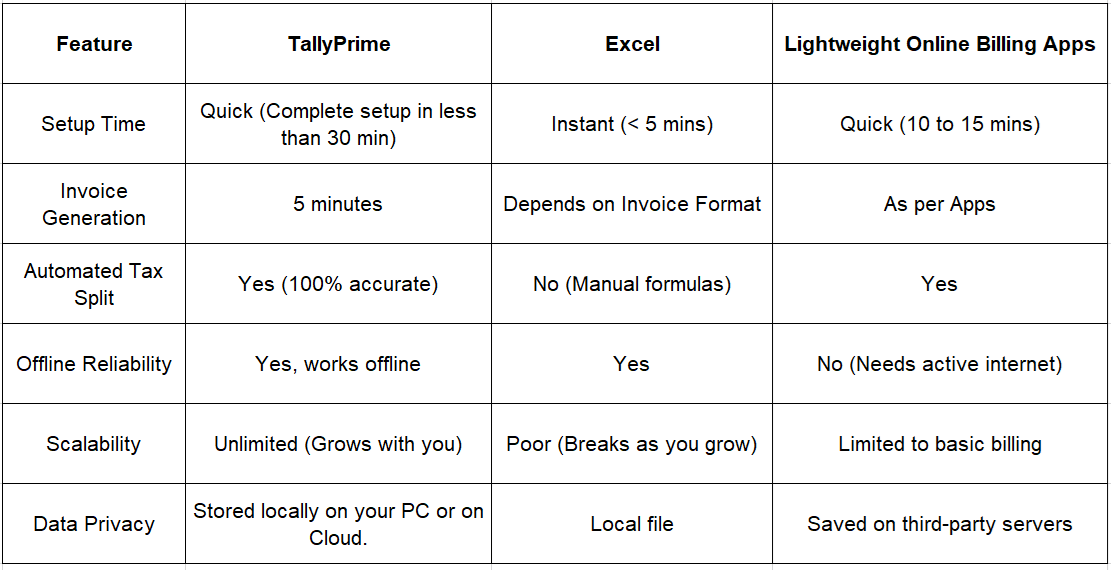
Actionable Checklist: Your 15-Minute Launch Blueprint
To make your setup as seamless as possible, gather these details before you sit down to configure your system:
a. Business Basics: Legal business name, billing address, and contact number.
b. Tax Credentials: Your 15-digit GSTIN and state registration code.
c. Item Details: A list of your top-selling items/services, their tax rates, and HSN/SAC codes.
d. Bank Info: Bank account number, IFSC code, and UPI ID (to print payment details directly on the invoice).
e. Company Logo: A JPG or PNG file of your logo to add a professional touch to your printed bills.
If you have these items ready on a notepad, your actual software setup time will be closer to 15 minutes!
Conclusion
When it comes to generating quick GST-compliant invoices without high software friction, TallyPrime stands out as an exceptionally easy-to-deploy solution.
Setting up basic GST invoicing in TallyPrime takes under 15 minutes—all that is required is entering your basic company details, GSTIN, and a product list. Once these essentials are in place, you can immediately start generating fully compliant GST invoices, making it just as fast to deploy as any online billing tool.