₹1,500 Discount on Combo Course
Grab Now Apply "FLAG26"
TallyPrime vs Vyapar for First-Time Users: Which Makes Invoicing and Basic Accounting Simpler?
TL;DR
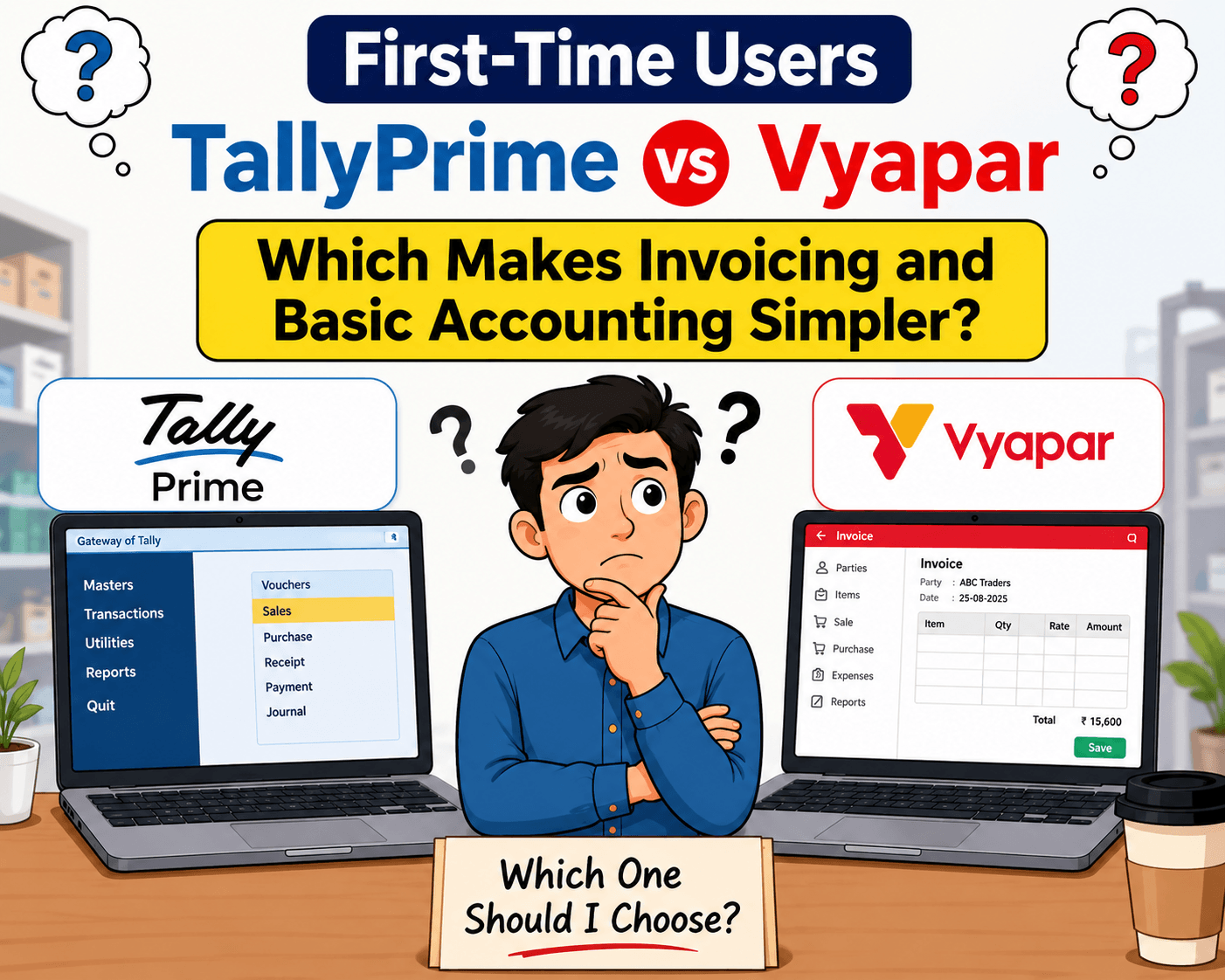
For a first-time business user, both TallyPrime and Vyapar can make invoicing and basic accounting easier, but the TallyPrime are designed with very different priorities. TallyPrime makes GST invoicing and basic accounting simpler for first-time users with an easy-to-follow workflow for customers, items, invoices, payments, and receipts.
You can start with basic billing and gradually learn GST, inventory, outstanding reports, and accounting as your business grows.
Unlike Vyapar's billing-focused approach, TallyPrime connects invoicing with complete accounting and business reports in one system.
If you want simple GST billing today and a complete accounting system for tomorrow, TallyPrime is the better choice.
Introduction
Choosing accounting software can feel difficult when you are using it for the first time.
A shop owner may simply want to create an invoice, record a payment, check outstanding amounts, and understand how much money the business is making. They may not want to learn accounting terminology before they can start working.
In my experience working around accounting and business users, ease of use depends heavily on what the user actually needs to do every day.
If your needs are primarily limited to simple billing and basic business tracking, TallyPrime is a better choice than Vyapar even initially. Because it supports more detailed accounting and business processes as your business grows, making TallyPrime may be the stronger long-term choice.
So, instead of asking which software is universally better, let's compare them from the perspective of a first-time user.
How do they handle day-to-day invoicing?
When a customer asks for a bill, you want something fast. Both platforms excel at letting you input item names, quantities, and tax rates.
● TallyPrime has a desktop-first design and a handy universal search bar (Go-To feature). Creating complex itemized invoices and viewing reports becomes very easy in TallyPrime with the help of mouse as well as keyboard shortcuts.
● Vyapar works like a smartphone app. Unlike TallyPrime, a financial statement is not generated upon entering a voucher.
My verdict: In my experience, TallyPrime is better for handling daily invoicing because of the speed and ease of invoice creation. And all types of GST compliance requirements are also handled automatically.
Do first time users need accounting knowledge to use TallyPrime?
The short answer is no. First-time users do not need a formal accounting background or a finance knowledge to use TallyPrime.
While TallyPrime is built on powerful double-entry accounting principles under the hood, it is designed so that everyday business owners and billing staff can use it without getting confused by debit and credit theory.
Here is how TallyPrime makes it accessible for beginners:
You Focus on Business Actions, Not Journal Entries
In the past, accounting software forced users to think like accountants, manually deciding which ledger to debit and which to credit for every single transaction. TallyPrime shifts the focus to real-world business actions. When you make a sale or record a purchase, you simply fill out a familiar invoice form (choosing the customer, item, and quantity). TallyPrime handles the complex backend accounting entries automatically.
Consistent Navigation and Shortcuts
One of the reasons beginners can pick up TallyPrime quickly is its uniform layout. Every screen uses the same functions or keys, for example, F8 for sales, F9 for purchases, and Ctrl+A to save. Once you learn how to navigate one menu or create one voucher, that pattern applies across the entire system.
TallyPrime vs Vaypar: Quick gst billing, Gst Compliances, Payment Record
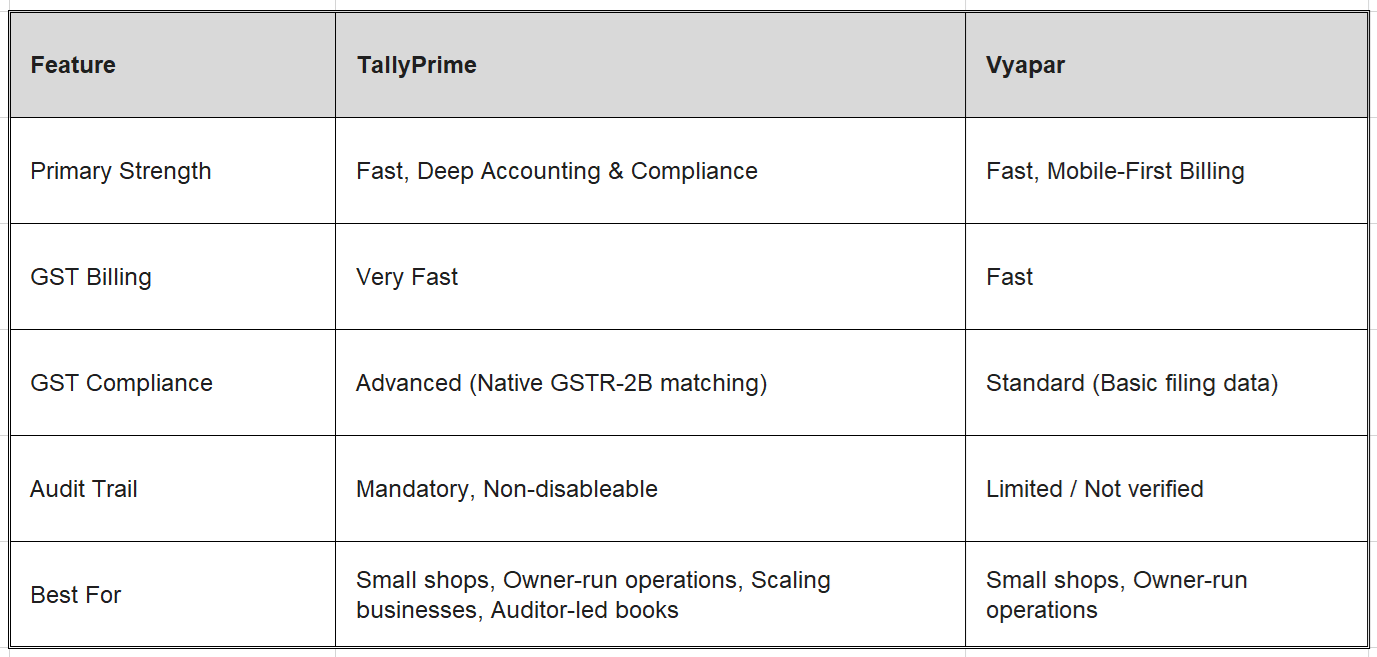
Both TallyPrime and Vyapar help you generate GST invoices and track payments, but they are designed for different stages of business growth.
Read more on TallyPrime GST updates: what gets updated automatically and how to always stay compliant
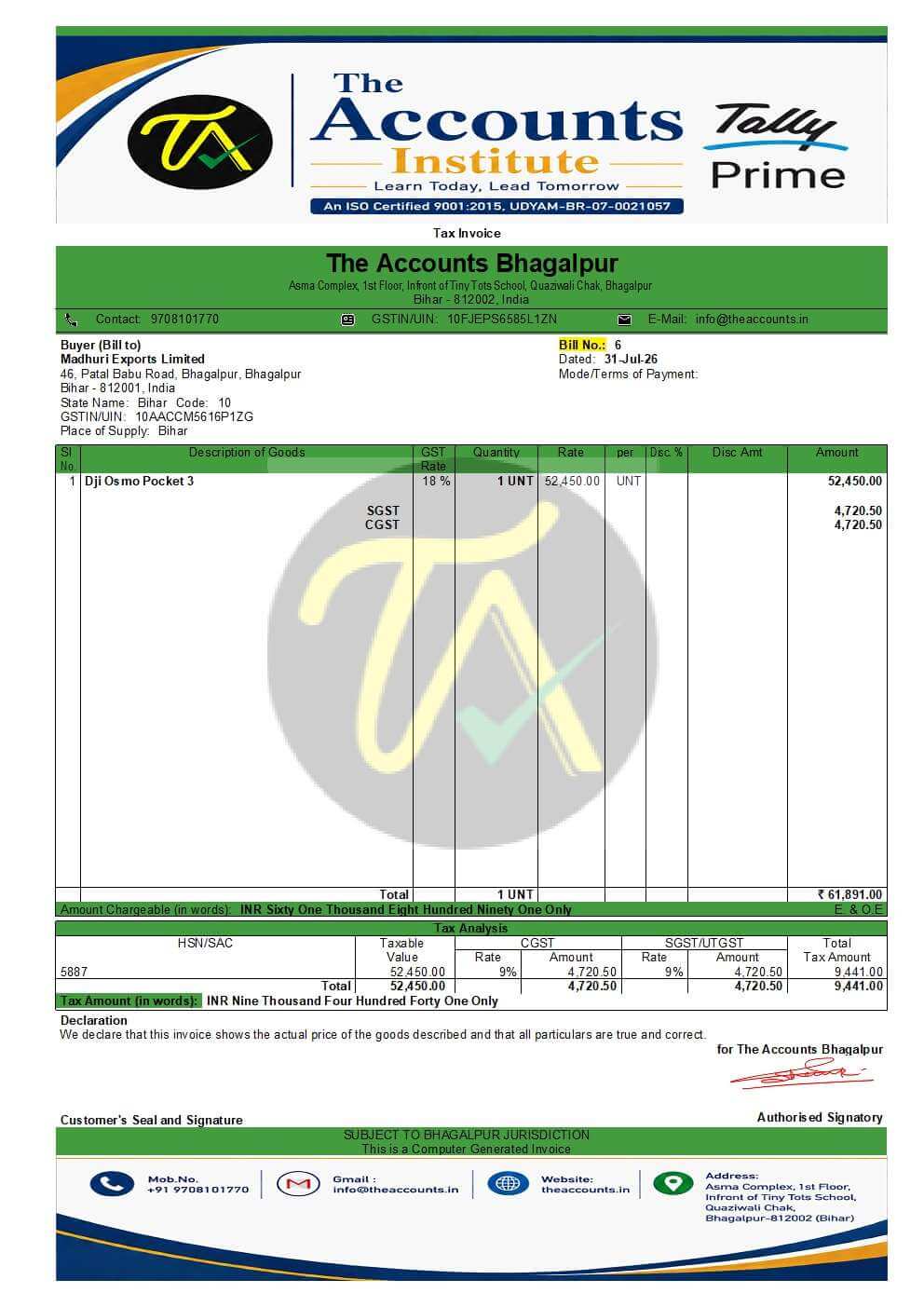
Can a first time user generate a quick GST Invoice in TallyPrime?
The simple answer is “Yes”. Even if someone does not have a commerce background or has never worked with GST before, they can easily generate GST invoices using TallyPrime. The process is simple and takes about 5 minutes for a first time user.
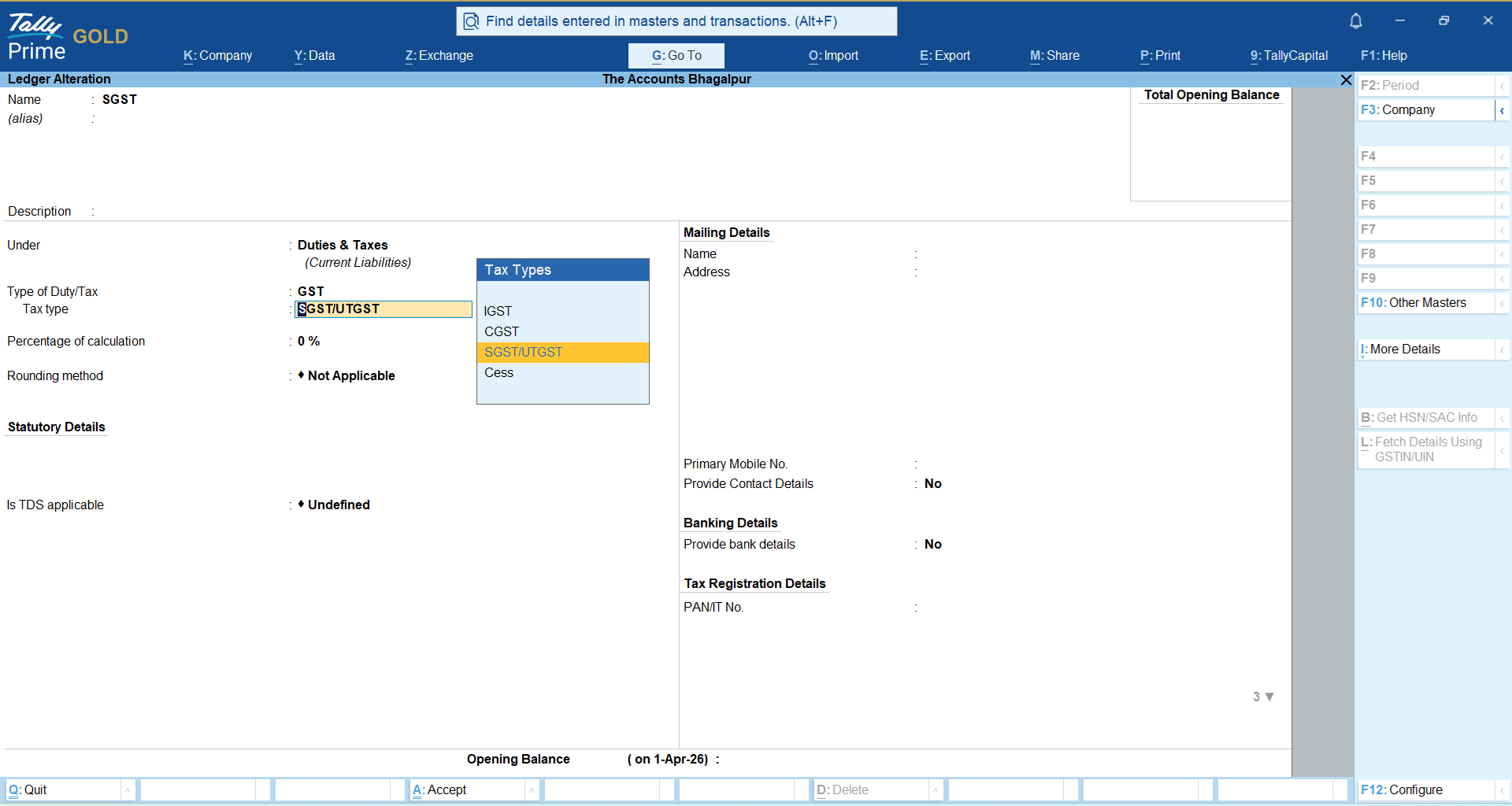
You just enable the GST and create the necessary masters (Sales, Customer, SGST, CGST, IGST, and Stock Item) and configure the GST settings. Then, simply record the sales entry in the Vouchers section, and the GST bill is ready, along with everything else, such as GST returns and stock managements.
Follow the below steps to generate a GST invoice in TallyPrime:
Create masters in TallyPrime
Gateway of Tally→ Create→ Ledger
Generate GST Invoice in TallyPrime
Gateway of Tally→ Vouchers→ Sales(F8)
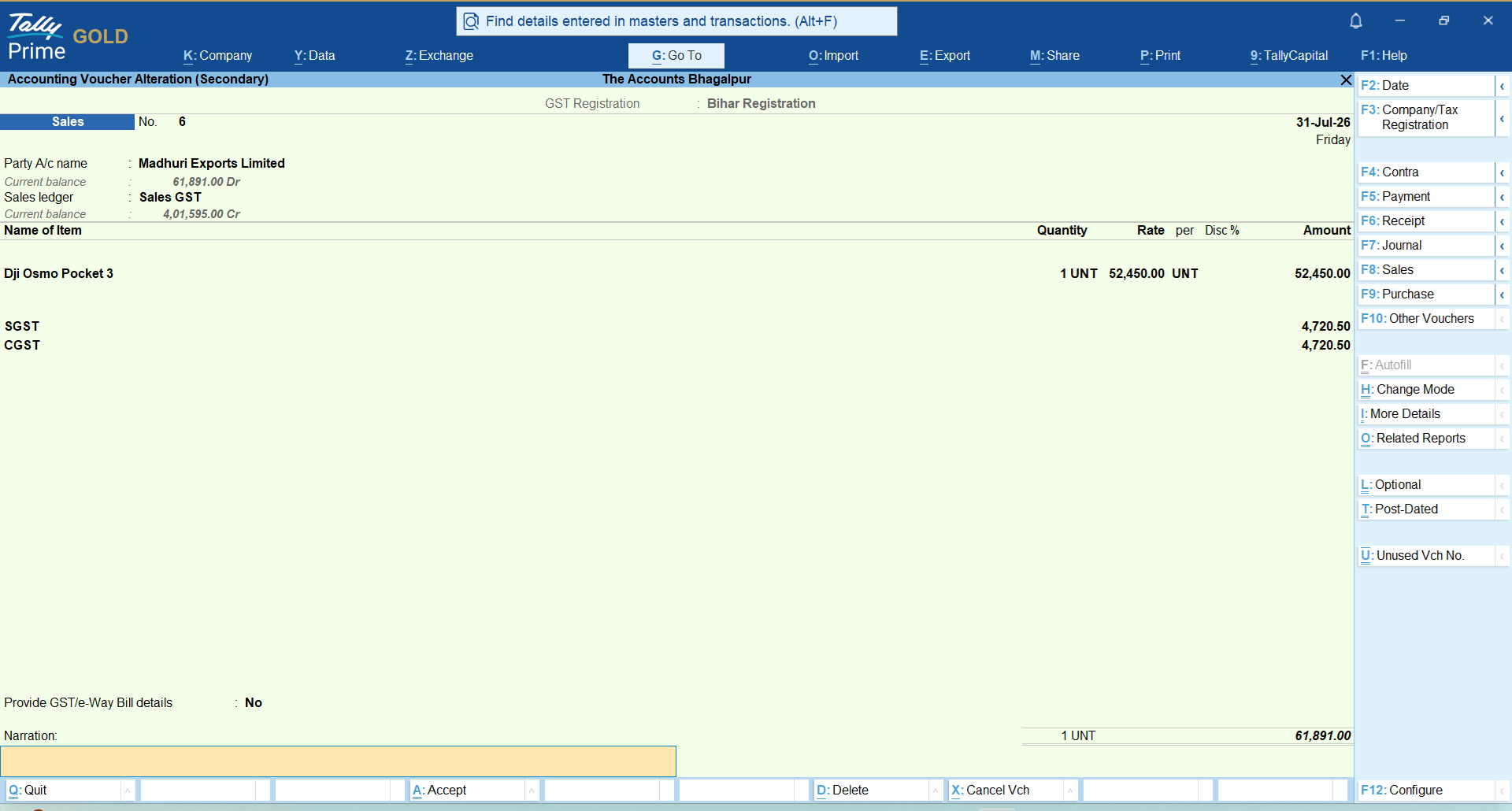
After saving the voucher, simply take a print (Ctrl+P) and Invoice is ready.
Why TallyPrime is "Better" for Compliance & Records
TallyPrime is essentially a "system of record" built to satisfy strict financial audits. If your business is growing or requires professional accounting standards, TallyPrime offers several advantages:
Native GSTR-2B Reconciliation: This is the biggest differentiator. TallyPrime allows you to import your GSTR-2B data directly and match it against your purchase register. This is crucial for protecting your Input Tax Credit (ITC). Vyapar generally lacks this deep, native workflow, often requiring manual workarounds that increase the risk of missing out on tax credits.
Audit-Ready Books: If you are a registered Private Limited company, you are legally required to have an "edit log" (audit trail) that cannot be disabled. TallyPrime has this built-in as a native, MCA-compliant feature. Vyapar’s audit trail is not verified from primary sources to the same professional standard.
Complex Financial Reporting: TallyPrime handles full double-entry accounting. It supports cost centers, profit-center analysis, and multi-GSTIN management within one company. If you have multiple branches or need to see which department is actually profitable, TallyPrime provides the tools to do that easily. But Vyapar does not create financial reports like TallyPrime.
Reliable Reconciliation: TallyPrime’s bank reconciliation is designed for heavy volume. It can import standard bank statement formats, auto-suggest ledger heads, and handle multi-account reconciliations in one session. But Vyapar does not match TallyPrime’s reconciliation capabilities.
Real-World Context:
Take Rohan, who runs a mid-sized wholesale electrical supplies business. In his first year, he used a lightweight mobile billing tool because it was cheap and let him print bills instantly.By year two, his transaction volume tripled, and his CA requested a voucher-level audit trail and strict Input Tax Credit (ITC) matching against GSTR-2B. His lightweight tool struggled to reconcile the heavy data cleanly, forcing a painful mid-year data migration to TallyPrime.
Conclusion
Choosing between TallyPrime and Vyapar boils down to your operational style. If you are a solo entrepreneur running a small retail counter, you can choose Vyapar but TallyPrime offers the same capabilities along with managing inventory across multiple categories, handling B2B transactions, leading to zero friction with your auditor.
Frequently Asked Questions
Is TallyPrime too complicated for someone with no accounting background?
No. TallyPrime features a simplified interface and a universal search bar with easy to learn and consistent shortcut keys, making the business management software easy to learn for any new user.
Is TallyPrime difficult for first-time users?
Not at all. New users can learn basic tasks like billing, receipts and payments within an hour, and gradually learn advanced accounting and reporting features.
Is Vyapar better than TallyPrime for small businesses?
It can be suitable for small businesses focused mainly on simple invoicing and basic business management, while TallyPrime offers broader capabilities, making it the better choice than Vyapar.
Which software is better for GST accounting?
Although Vyapar supports GST-related requirements, businesses with more detailed accounting and compliance needs should evaluate TallyPrime's broader GST and accounting capabilities.
Should a growing business start with TallyPrime?
If the business expects increasing transactions, inventory, GST requirements, employees or locations, starting with a scalable business management software like TallyPrime is a practical choice.