₹1,500 Discount on Combo Course
Grab Now Apply "FLAG26"
TallyPrime on Cloud vs Desktop: Which one should you choose for your business?
TL;DR
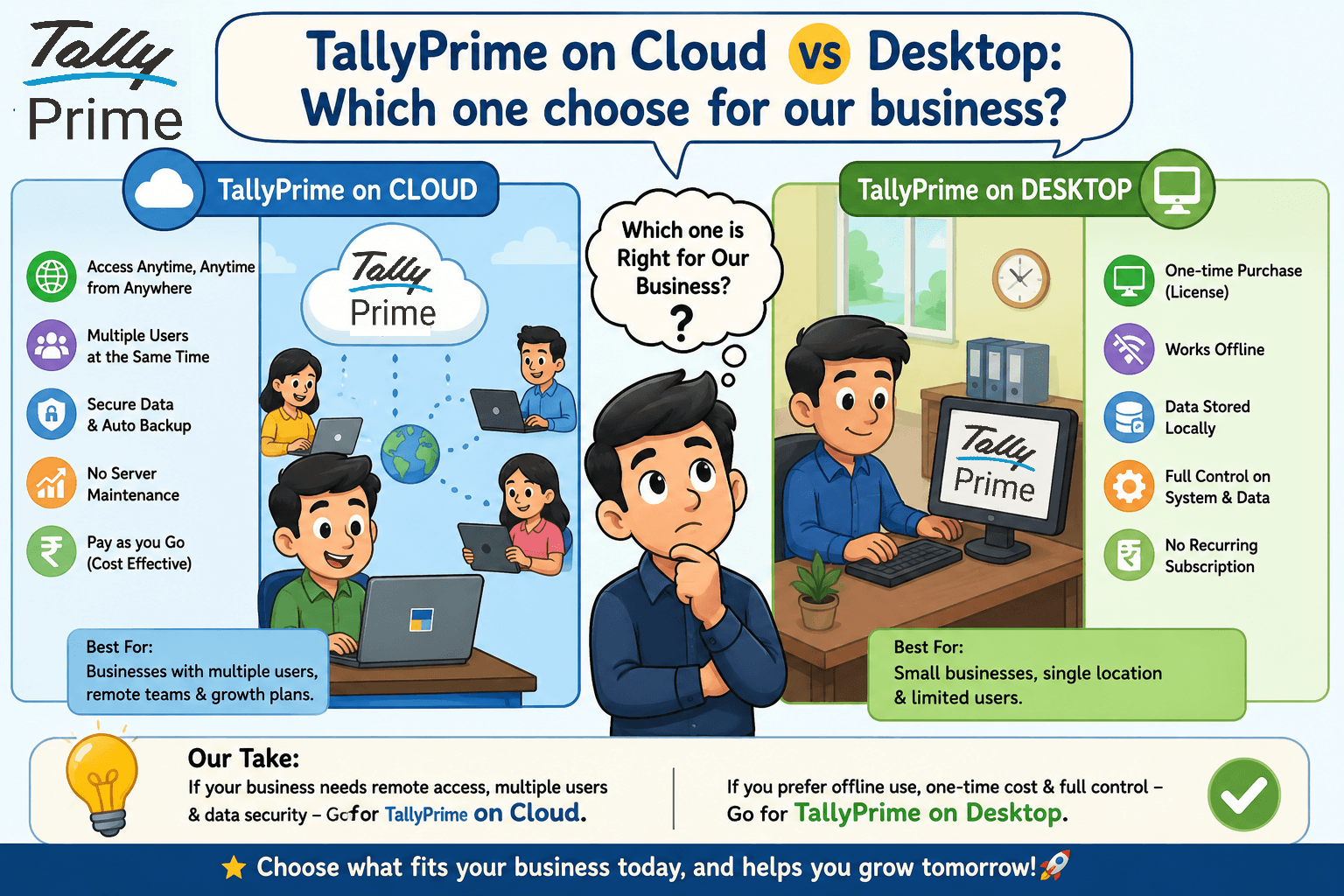
Should you use TallyPrime on Cloud or install it on your desktop? The right answer depends on your business size, team, and how you work. If your employees need to access TallyPrime from different locations, cloud is usually the better choice. If you work from a single office and prefer lower recurring costs, the desktop version is often enough. In this blog, I'll compare both options, share real business examples, and help you choose the best solution for your company.
Introduction
Should you use TallyPrime on Cloud or the Desktop version? The answer depends on how your business works. I've noticed that many owners choose a setup based on what others recommend instead of what their business actually needs.
In my experience, small businesses with a single office often find the desktop version more than enough. On the other hand, businesses with multiple branches or remote teams usually benefit more from TallyPrime on Cloud because it allows easy access from anywhere.
In this blog, I'll compare both options in simple terms, explain their pros and cons, share practical examples from businesses I've worked with, and help you decide which solution is the right fit for your business.
TallyPrime on Cloud vs. Desktop: Which Version Fits Your Business Better?
Choosing between local software and a cloud setup is one of the most frequent dilemmas I help business owners navigate. If you are trying to decide how to run your business accounting, the short answer is simple: pick Desktop if everyone who touches your accounts sits in the same room every day. Pick TallyPrime Cloud Access if you want your team to log in from anywhere, securely, without managing heavy IT hardware.
Let's break down how these two setups handle everyday business pressures so you can pick the right one for your operations.
What Is the Real Difference Between the Two?
To put it plainly, the difference isn't the software itself—the features, screens, and shortcuts of TallyPrime remain exactly the same. The real shift is where your accounting data lives and how you access it.
With the traditional desktop route, Tally is installed on a specific computer or a local office server. With the cloud version, Tally runs on a secure virtual server, allowing your team to log into the system securely through a web browser or a small app on any device.
What Are the Pros and Cons of TallyPrime Desktop?
The Pros:
Total physical ownership: Your data lives strictly within your walls.
Zero internet dependency: If your office internet goes down, your billing counter doesn't stop. You can keep logging invoices locally without a hitch.
One-time predictable cost: You buy your perpetual license once and only pay for yearly Tally Software Services (TSS) renewals.
View Reports Remotely: While working remotely, you can still access business reports in TallyPrime on your mobile browser.
The Cons:
The backup nightmare: I’ve seen multiple clients lose weeks of financial records because their office PC crashed or got hit by ransomware, and nobody had updated the external backup drive or opted for automated backup.
Zero flexibility: If you are traveling or at home, you cannot record entries without cloud access.
What Are the Pros and Cons of TallyPrime on Cloud?
Switching to a cloud setup changes your accounting from a physical machine into a utility that is always available.
The Pros:
Work from anywhere: Your data entry team, your outdoor sales reps, and your chartered accountant can all access live data simultaneously from different cities.
Automated safety nets: Cloud allows automated daily backups and data security protocols, lifting a massive burden off your shoulders.
Lighter hardware requirements: You don’t need to buy high-RAM servers for the office. Even a basic laptop can run heavy Tally data smoothly because the cloud virtual machine does all the processing.
The Cons:
Internet reliant: You need a stable internet connection to work. If your connection drops frequently, your workflow will stutter.
Real-World Context: A Tale of Two Clients
To bring this to life, let’s look at two businesses I advised last year:
Company A (Local Wholesale Trader): They operate from a single large warehouse. Their billing staff sits in one place, and the owner is always at the desk. For them, TallyPrime Desktop was perfect. They didn’t need remote access and preferred keeping everything on a solid local network.
Company B (E-commerce & Distribution Brand): They have a main corporate office, two separate third-party fulfillment centers, and a remote sales team. Their accountants were constantly waiting for end-of-day data syncs. Moving them to TallyPrime on Cloud allowed their dispatch teams to log inventory updates in real-time, eliminating data entry delays completely.
Which One Wins Based on Your Business Size and Industry?
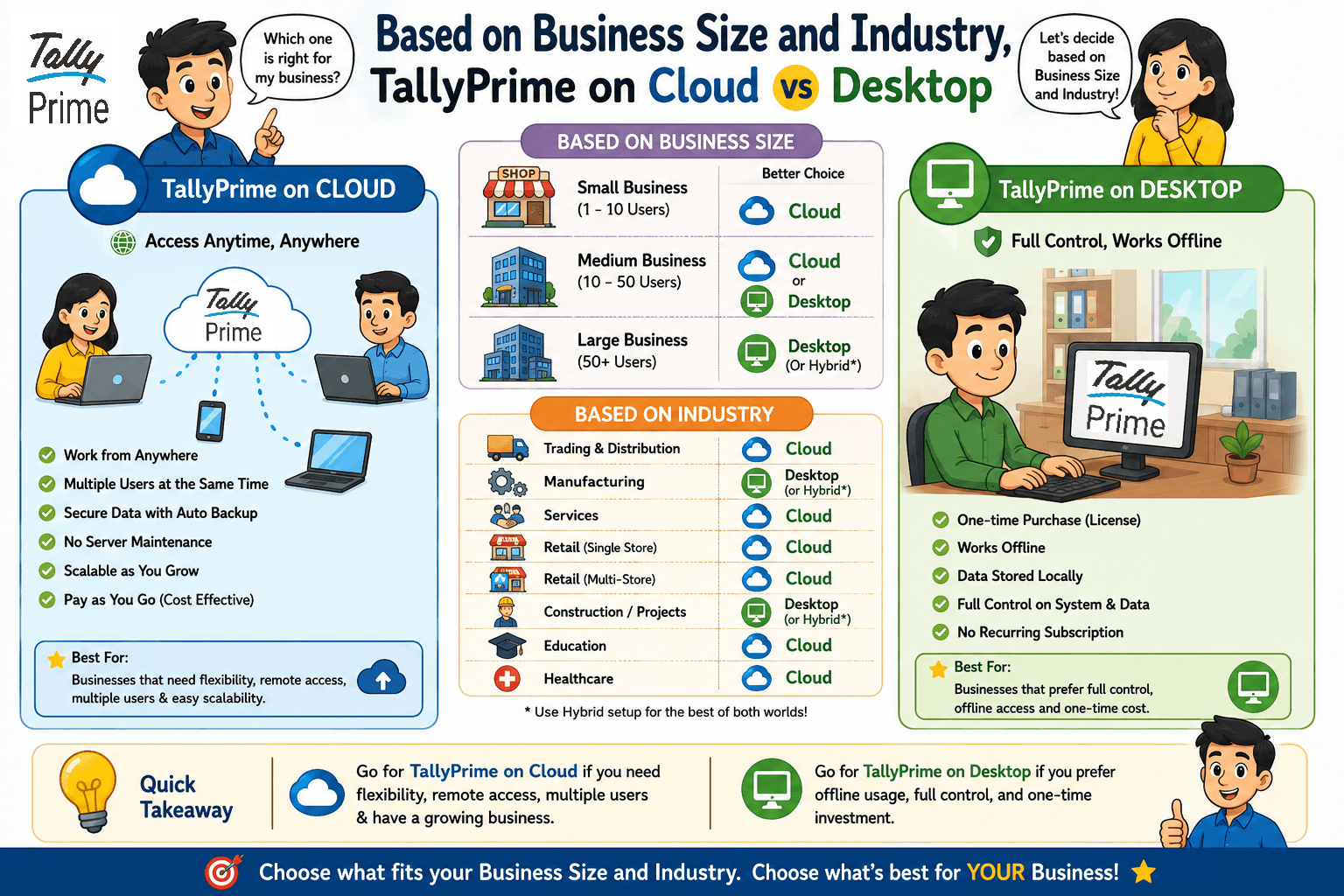
If you are still on the fence, you can use this simple framework to make your decision:
By Business Size
Micro & Small Businesses (1-3 Users): If you operate out of a single office, the Desktop version keeps your overhead low. Growing & Mid-sized Businesses (5+ Users): Go with the Cloud. As you add branches, warehouses, or remote staff, trying to connect them to an office computer via slow VPNs will only cause constant system lag.
By Industry Focus
Retail & Supermarkets: Stick to Desktop for your primary billing counters to ensure uninterrupted checkout lines even during internet blackouts.
Service Agencies, Logistics, & Manufacturing: Cloud is a clear winner here. These industries rely heavily on real-time coordination, multi-location updates, and constant field reporting.
TallyPrime on Cloud vs Desktop: Which One Should We Choose for our Business?
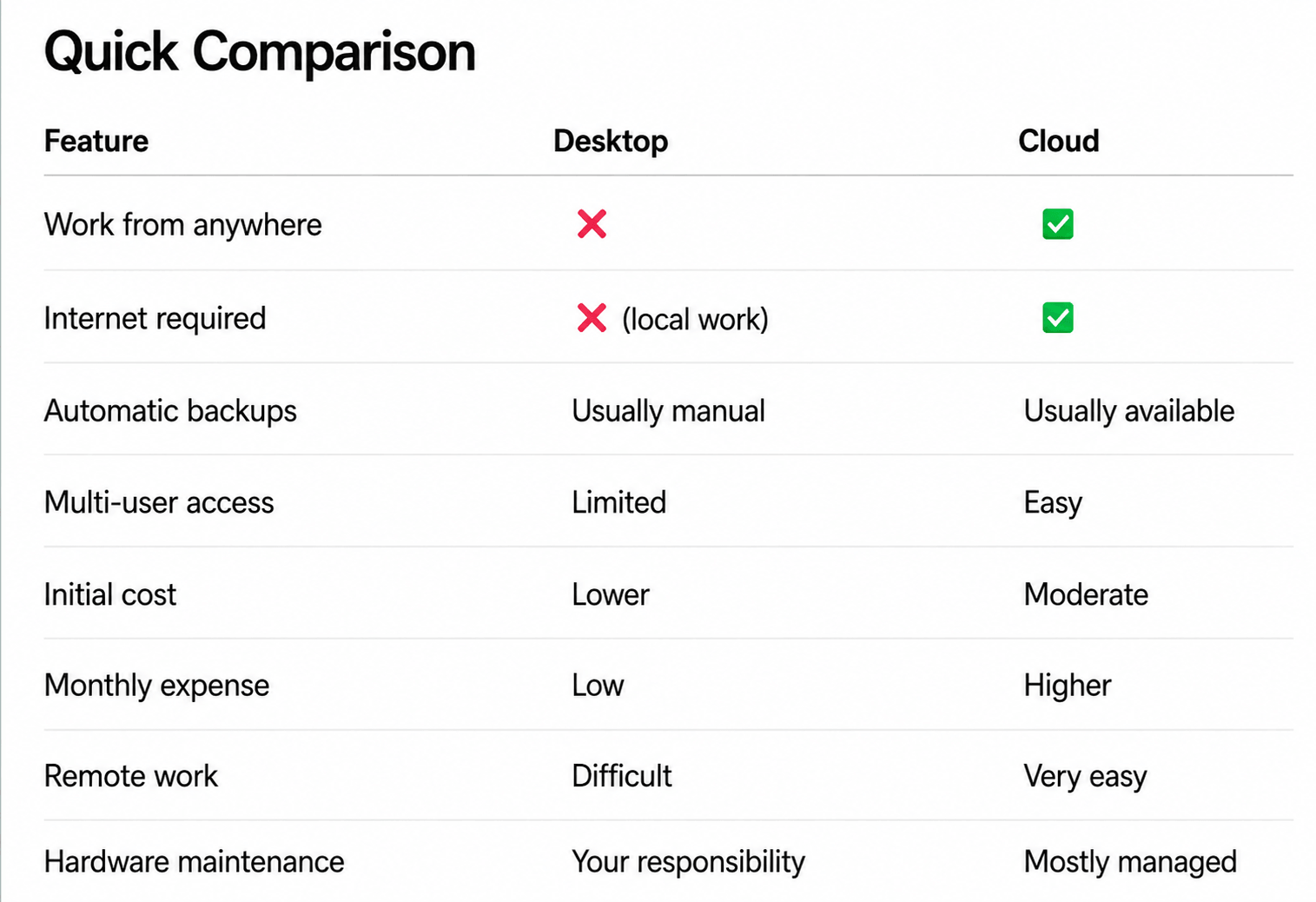
This can also be understood using a comparison chart.
Conclusion:
There is no single solution that fits every business.
For small businesses working from one office, TallyPrime Desktop remains affordable, simple, and dependable.
For growing businesses with multiple users or locations, TallyPrime on Cloud provides flexibility, better collaboration, and easier access to business data.
In my experience, the best decision is the one that matches how your business actually works—not simply the newest technology.
Sometimes the desktop is exactly what you need.
Sometimes the cloud helps your business grow faster.
Choose the option that supports your daily operations today while leaving room for tomorrow.