₹1,500 Discount on Combo Course
Grab Now Apply "FLAG26"
TallyPrime Cloud Access vs Zoho Books: Which tool is better for your business?
TL;DR – 30-Second Summary
TallyPrime Cloud Access brings together the convenience of remote, browser-based access with the accounting depth, entry speed, and reliability that TallyPrime is already known for. This lets growing businesses run their full accounting and inventory operations from anywhere with keyboard-driven efficiency. Zoho Books is a good fit for small service businesses with light invoicing needs. For businesses managing high transaction volumes, multi-location inventory, or that need complete ownership over their data infrastructure, TallyPrime Cloud Access is built to deliver cloud flexibility without trading away the operational power businesses already rely on TallyPrime for.
Introduction
Choosing the right accounting software comes down to understanding what your business actually needs. As a business, you need remote accessibility, deep accounting capability, operational speed, and deployment flexibility, together, not traded off against each other.
TallyPrime Cloud Access refers to the set of capabilities that let businesses run, manage, and access their TallyPrime environment remotely over secure cloud infrastructure, while retaining everything TallyPrime already delivers for day-to-day operations.
In my experience helping small and mid-sized enterprises modernize their financial operations, the businesses that get the most value are the ones that look past the cloud-vs-desktop framing altogether and ask a more useful question: which setup lets my team move fastest, stay resilient, and keep full ownership of our business data? It comes down to finding the right balance of remote accessibility, deep accounting capabilities, operational speed, and deployment control.
This comparison walks through how TallyPrime Cloud Access and Zoho Books stack up on the factors that matter most as a business scales.
Why is TallyPrime Cloud Access Better than Zoho Books?
If your business already relies on TallyPrime for accounting, GST, inventory, invoicing, payroll, and detailed business reports, then TallyPrime Cloud Access is a better option than switching to Zoho Books, especially if your primary need is to access the entire TallyPrime environment from anywhere.
You get the full TallyPrime experience on the cloud
TallyPrime Cloud Access hosts TallyPrime on a cloud-based virtual computer. You can access it via a browser or a client while continuing to work with TallyPrime and your existing business data. TallyPrime states that Cloud Access offers all the features of TallyPrime, and users can access it from anywhere. With TallyPrime Cloud Access, authorized users can access the same business
environment remotely and work on the same data.
The key difference:
TallyPrime Cloud Access is essentially “your TallyPrime on the cloud”, rather than replacing TallyPrime with another accounting platform.
How Do They Compare in High-Volume Accounting and Speed?
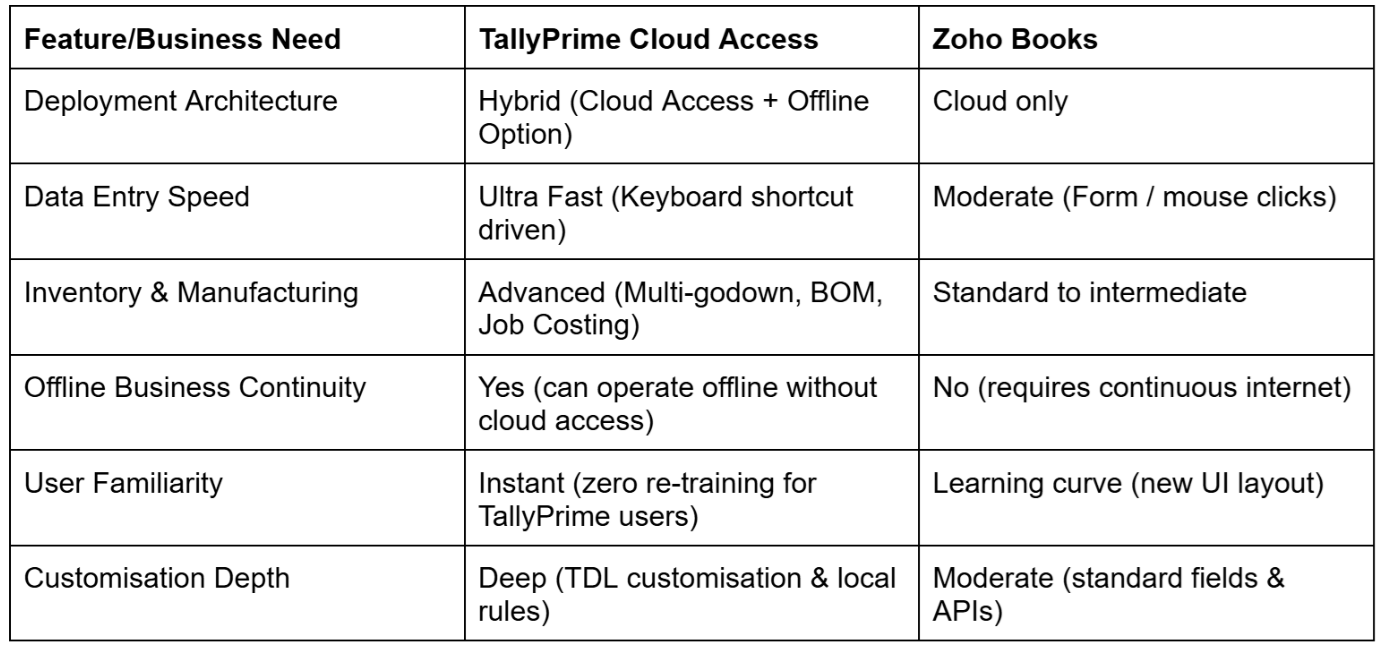
In my work with distributors, manufacturers, and wholesalers, entry speed is non-negotiable. Users accustomed to Tally can enter hundreds of vouchers daily using rapid keyboard shortcuts without ever touching a mouse.
Zoho Books relies on form fields, dropdowns, and browser reloads. While elegant for creating a few dozen professional invoices a month, high-volume data entry can feel sluggish compared to Tally’s lightning-fast flow.
✔ TallyPrime Cloud Access: It maintains 100% keyboard operational speed. Your accountants can enter data without any lag in speed, regardless of where they access it from.
✔ Zoho Books: Mouse-heavy web UI slows down dedicated accounts team members processing high daily voucher volumes.
What Happens When the Internet Drops or Connection Is Unstable?
What happens when your warehouse or branch internet goes down during peak dispatch hours?
✔ With Zoho Books: Work comes to a complete halt. Because it is strictly cloud-only, you cannot log sales, generate delivery challans, or print invoices without an active internet.
✔ With TallyPrime: You have deployment flexibility. You can host your central accounting environment on the cloud for remote access and leadership visibility, or deploy TallyPrime locally where uninterrupted offline operations are critical. Choose the setup that best fits how your business works.
Which Tool Handles Complex Inventory, Manufacturing, and Customization Better?
Zoho Books handles basic stock management and simple reorder points smoothly. However, as business requirements grow complex, platform limitations start surfacing.
TallyPrime excels in complex operational environments:
✔ Multi-godown management with batch-wise, lot-wise, and expiry tracking.
✔ Bill of Materials (BOM) and multi-stage manufacturing voucher flows.
✔ Extensive customization to tailor reports, voucher approvals, and industry-specific fields.
If your business relies on advanced inventory calculations or custom workflows, TallyPrime Cloud Access delivers those heavy-duty capabilities anywhere. Zoho Books often requires upgrading to separate Zoho ecosystem apps or complex API integrations.
Real-World Business Example: Auto Parts Distributor
Case Study: Regional Spare Parts Distributor
A regional auto spare parts distributor with 3 branches considered switching from Tally to Zoho Books for remote visibility. However, they manage 12,000+ SKUs with bin locations and daily rapid sales entries.
Testing Zoho Books revealed significant entry bottlenecks at counter sales. Instead of switching platforms, we implemented TallyPrime Cloud Access. The business owner gained real-time mobile dashboard access while branch counters retained Tally's rapid keyboard entry speed without altering their familiar workflow.
How Do They Compare on Data Ownership and Control?
Data ownership is critical for business security:
✔ Zoho Books: Data resides entirely on Zoho’s multi-tenant cloud servers. While secure, you are bound to their cloud infrastructure and export formats.
✔ TallyPrime Cloud Access: Your accounting database is hosted on a cloud server/instance with custom backup controls. You retain total data sovereignty, local backup capability, and complete control over user access roles. Additionally, you can also use Tally Drive for secure and automated cloud backups.
TallyPrime Cloud Access vs Zoho Books on CA Compatibility and GST Filing
Almost every CA in India knows Tally inside out. If your CA handles your end-of-year audit and tax returns, they will likely prefer a Tally backup file. TallyPrime Cloud Access makes it easy for your CA to log in directly to your remote environment and complete audit work without coming to your office.
Zoho Books offers an Accountant Portal. You can invite your CA to your account where they can review GST reconciliations and export reports directly to Excel.
Frequently Asked Questions
1. Can I access TallyPrime on Mac or mobile devices using Cloud Access?
Yes. TallyPrime Cloud Access enables secure web browser access across Mac, Windows, iPads, and smartphones without needing local software installation.
2. Is TallyPrime Cloud Access as secure as cloud-only tools?
Yes. TallyPrime Cloud Access uses encrypted web connections, automated cloud backups, and dedicated server environments to ensure enterprise-grade security.
3. Do my accounting staff need re-training to use TallyPrime Cloud Access?
No. Your team uses the exact same Tally interface and keyboard shortcuts they already know, eliminating training time and operational learning curves.
4. Can I migrate from local Tally to TallyPrime Cloud without losing data?
Yes, you can move from a local TallyPrime setup to TallyPrime Cloud Access without losing your existing data. Migration is seamless, your existing Tally company data including ledgers, vouchers, and configurations, can be moved to the cloud environment and migrated using TallyPrime’s built-in migration process.
5. Which tool is better for GST compliance and e-invoicing?
Both support GST and e-invoicing, but TallyPrime Cloud offers deeper error validation before direct upload to the portal, preventing incorrect submissions.