₹1,500 Discount on Combo Course
Grab Now Apply "FLAG26"
TallyPrime 7.0 vs Tally ERP 9:What Changed, What Got Better and What Takes Getting Used To
TL;DR
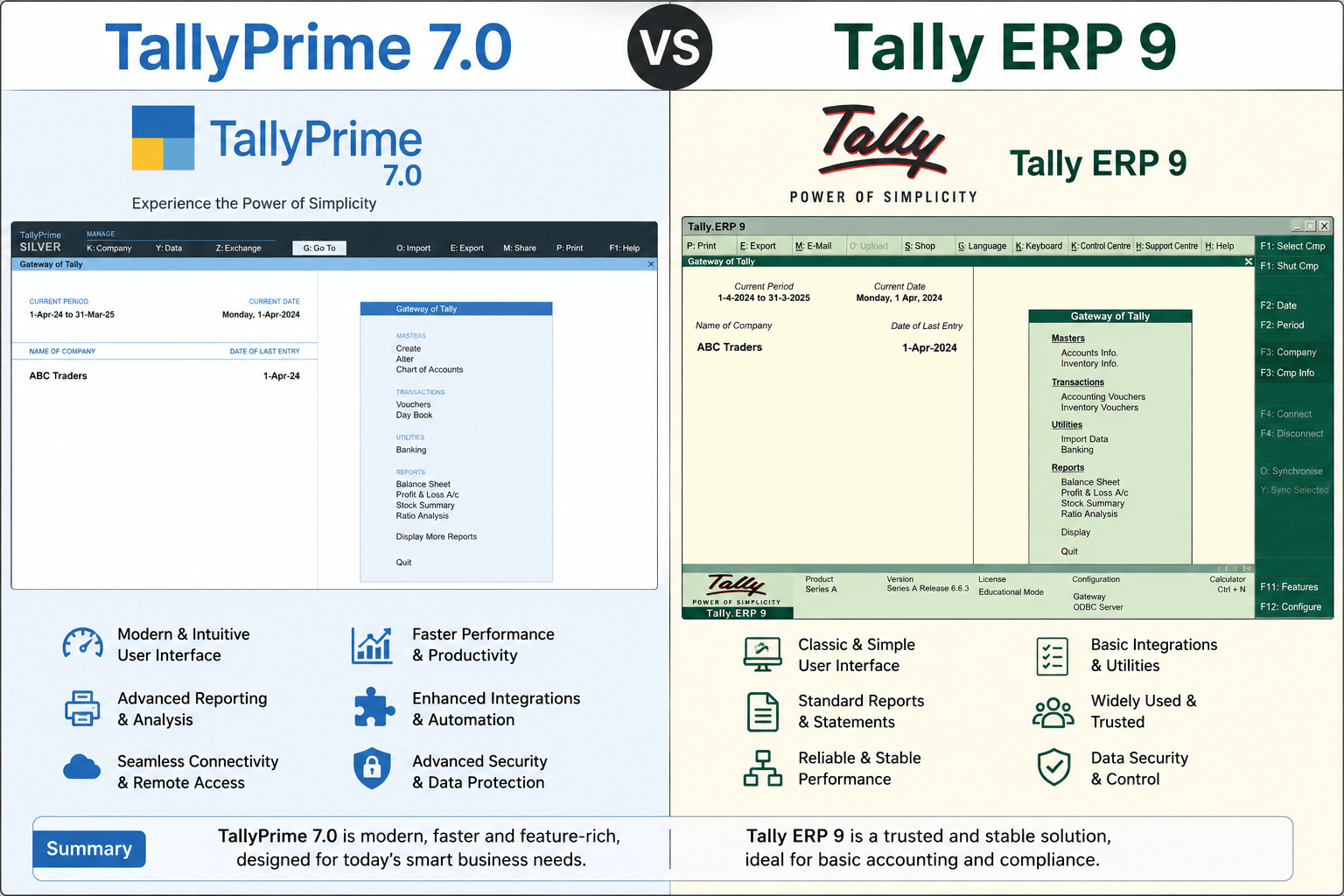
Still clinging to Tally ERP 9? Moving to the latest TallyPrime 7.0 is no longer just about a prettier screen, it is a massive leap in business automation. While ERP 9 was a reliable manual workhorse, TallyPrime 7.0 introduces fully automated cloud backups via TallyDrive, direct bank payments without leaving your software, universal search, and bulletproof GST compliance. Yes, the muscle memory of old keyboard shortcuts will take a week to unlearn, but the massive time savings and data security make it an essential upgrade for any growing business.
Introduction
Many businesses have used Tally ERP 9 for years and know every shortcut by heart. So when TallyPrime arrived with TallyPrime 7.0, one common question I heard is:
"Should we upgrade, or stick with what we already know?"
In my experience working with business owners, accountants, and billing teams, the answer usually depends on one thing: whether your team values familiarity more than productivity.
TallyPrime 7.0 keeps the speed and keyboard-driven approach people love, but makes many daily tasks simpler and more intuitive.
Is It Finally Time to Let Go of Tally ERP 9 for TallyPrime 7.0?
If you walk into the accounts department of many traditional Indian businesses, you will still hear the rapid-fire clack-clack-clack of keyboards navigating the classic, bright green screens of Tally ERP 9. It was released over a decade ago, and for many business owners and accountants, it feels like a comfortable pair of old shoes.
But here is the reality I see while working on the ground with clients: running a business today is vastly different. Between automated e-invoicing, stringent ITC reconciliation, and the need for instant financial data on your phone, ERP 9 is starting to feel its age.
TallyPrime 7.0 isn't just a cosmetic makeover. It is a completely redesigned engine built to tackle modern business challenges. Let’s look at what has truly evolved, what makes your life easier.
What Changed with TallyPrime 7.0?
To put it simply, Tally ERP 9 was built for data entry; TallyPrime 7.0 is built for data management and intelligence.
1. From Menu Mazes to a Universal Search Bar
In Tally ERP 9, if you wanted to view a specific report like the GSTR-3B or an Outstanding Ledger, you had to memorize a sequence of keys (like Display > Statutory Reports > GST > GSTR-3B). If a new trainee didn't know the exact path, they were lost.
TallyPrime 7.0 introduces "Go To" and the new SmartFind search bars at the top of the screen. You just click it or press Alt+G, type what you are looking for—even with a partial name or a typo—and Tally brings it to you instantly. You can jump from a voucher entry to a balance sheet and back without losing your spot.
2. From Manual Data Backups to Automated Cloud Security
In my years of consulting, the most heartbreaking calls I get are from clients whose office computers crashed, wiping out years of accounting data because someone forgot to take the daily backup on a pendrive.
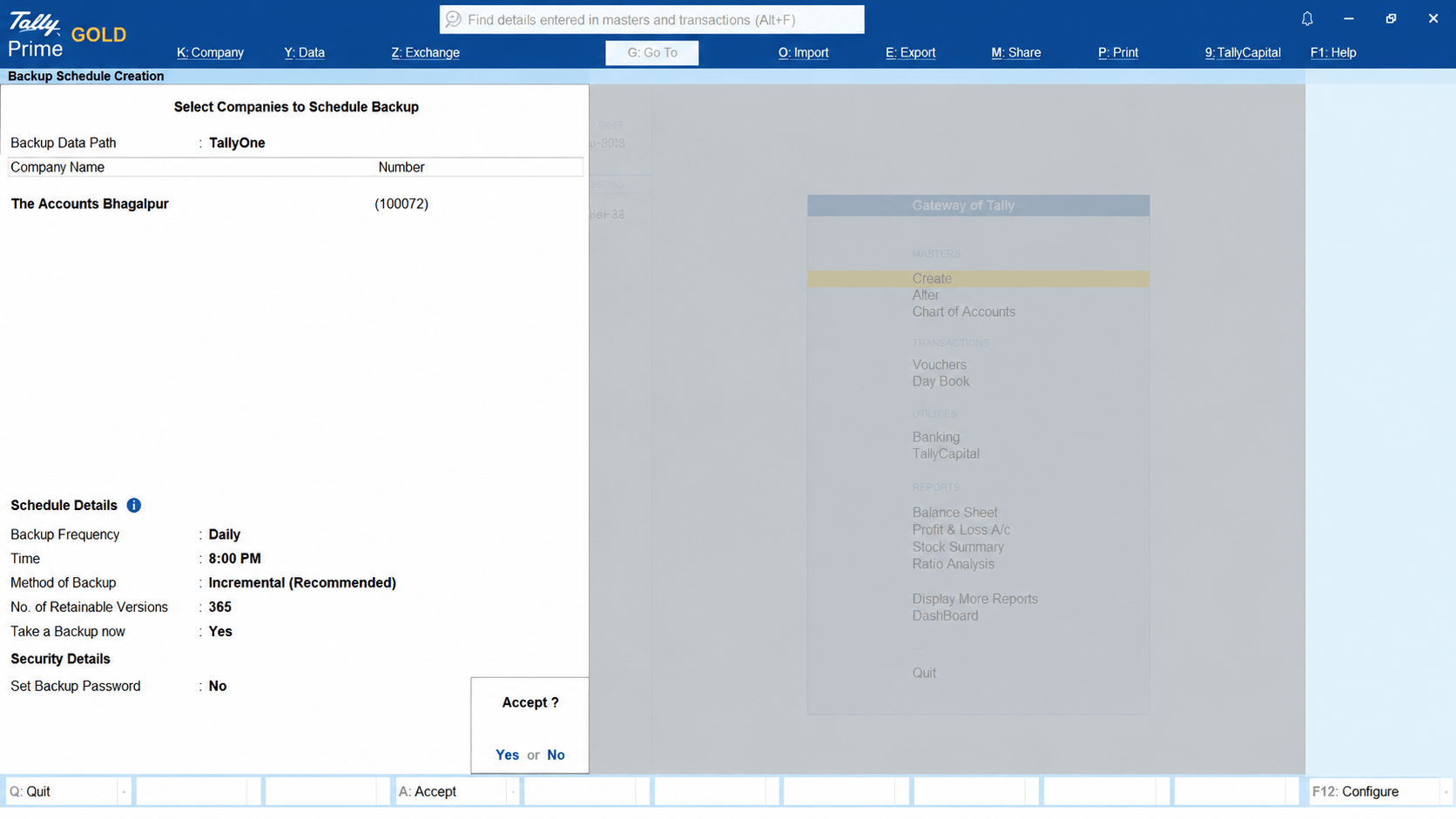
Tally ERP 9 relied entirely on human discipline for backups. TallyPrime 7.0 changes the rules with an Auto Backup Engine linked directly to TallyDrive (cloud storage).
How it works: It quietly backs up your data to the cloud on a schedule you set—even when Tally is closed. It even features version control, letting you restore a specific historical backup if an error is made.
Gateway of Tally → Data (Alt+D) → Backup & Restore → Schedule Backup
What Got Significantly Better?
The upgrades in Release 7.0 focus heavily on saving you time and removing double work.
Direct Payments with PrimeBanking
In the past, paying a vendor meant opening Tally, checking the bill, opening your bank portal in a browser, typing out the account details, making the payment, copy-pasting the UTR number back into Tally, and manually marking it as paid.
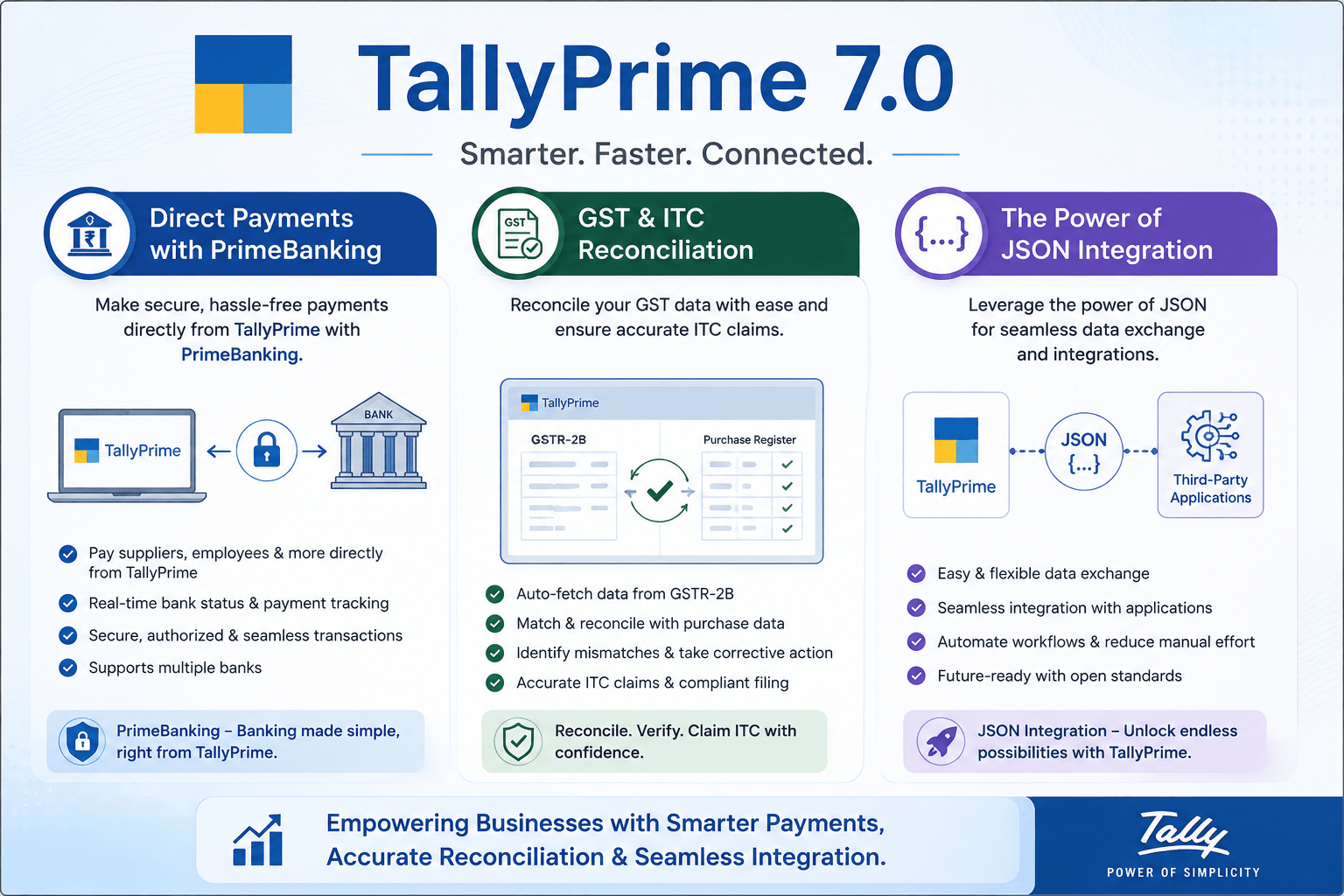
With PrimeBanking Payments in TallyPrime 7.0, you can pay suppliers directly inside Tally. It connects with major banks (like HDFC, ICICI, SBI, Axis, Kotak), allows you to set safe transaction limits, and updates the payment status in real-time. It even automatically shoots a payment advice email to your vendor.
Bulletproof GST & ITC Reconciliation
GST compliance has become a tightrope walk for business owners. If your vendor doesn't upload their invoice, you lose your Input Tax Credit (ITC).
Tally ERP 9 required painful external excel sheets to match data. TallyPrime 7.0 introduces a deep ITC Reduction Panel that syncs live with the government's Invoice Management System (IMS). It auto-detects duplicate vouchers, highlights mismatches, and allows you to file cleaner returns with zero guesswork.
The Power of JSON Integration
Modern businesses use multiple apps—e-commerce platforms, custom point-of-sale (POS) billing apps, or CRMs. Tally ERP 9 struggled to talk to these modern systems cleanly. TallyPrime 7.0 natively supports JSON Data Exchange, making it incredibly easy to link your custom billing tools or websites directly to your accounting engine without data errors.
What Takes a Little Getting Used To?
Change is rarely painless. If you are planning to upgrade, warn your team about these minor speedbumps:
- Unlearning Keyboard Shortcuts: Tally ERP 9 veterans use keyboard shortcuts like martial artists. TallyPrime standardizes many shortcuts to match global software practices (like using Ctrl+C and Ctrl+V for copy-paste instead of the old Ctrl+Alt+C). It takes about 3 to 5 days of minor annoyance to build the new muscle memory.
- The Look and Feel: The stark, high-contrast green screen is replaced by a clean, modern navy and white layout. Some old-school users initially complain it looks "too corporate," but they quickly realize it strains the eyes far less during long working hours.
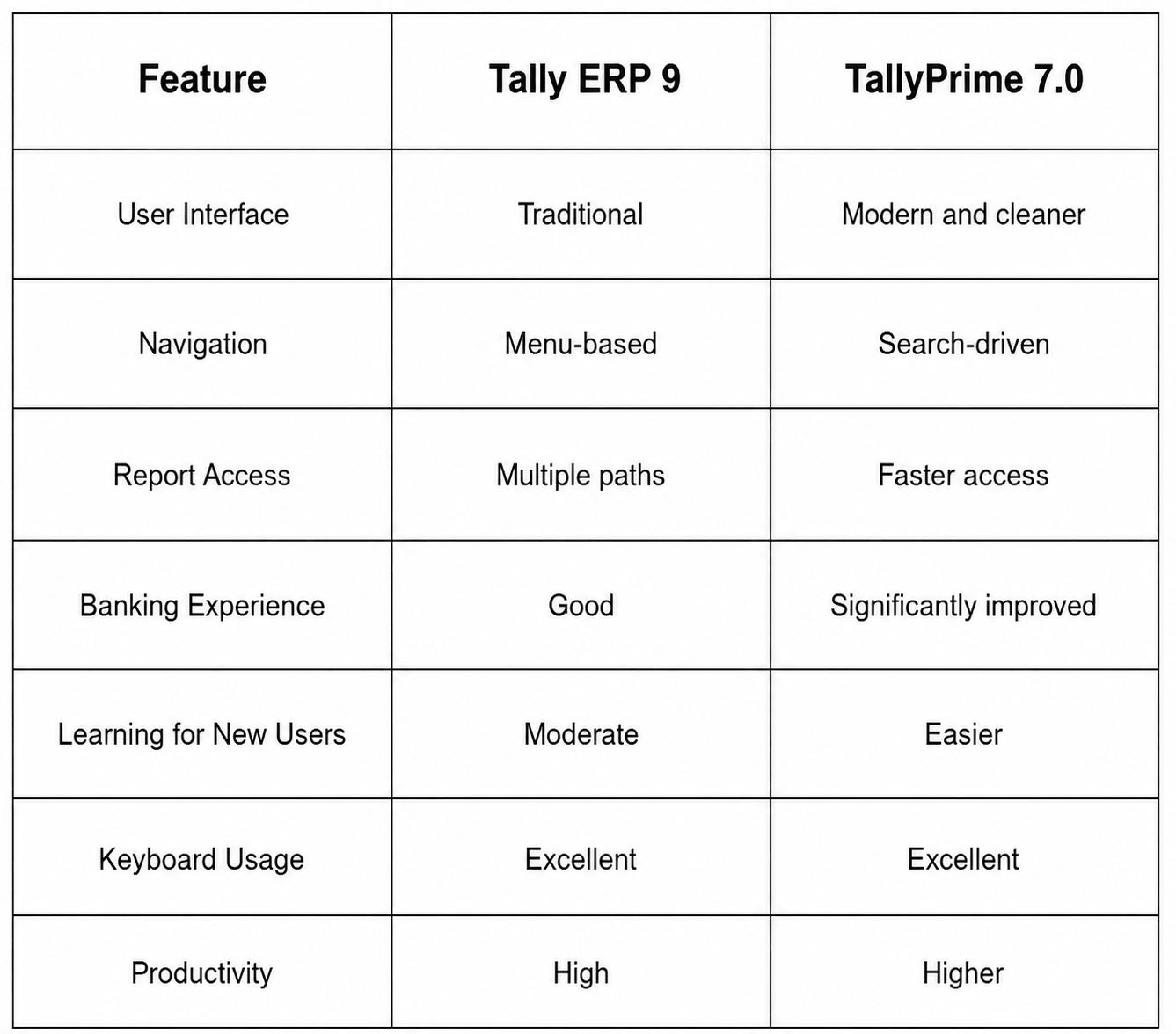
Tally ERP 9 vs TallyPrime 7.0: Quick Comparison
Upgrade Checklist
Before upgrading:
- Train users on Go To
- Review banking workflows
- Familiarize staff with new menus
- Test frequently used reports
- Backup existing data
- Schedule a short orientation session
The businesses that adapt quickly are usually the ones that spend a little time learning the new workflow instead of trying to make TallyPrime behave exactly like ERP 9.