₹1,500 Discount on Combo Course
Grab Now Apply "FLAG26"
Godown-Wise Stock and BatchTracking in TallyPrime: A Step-by-Step Guide for Distributors
TL;DR
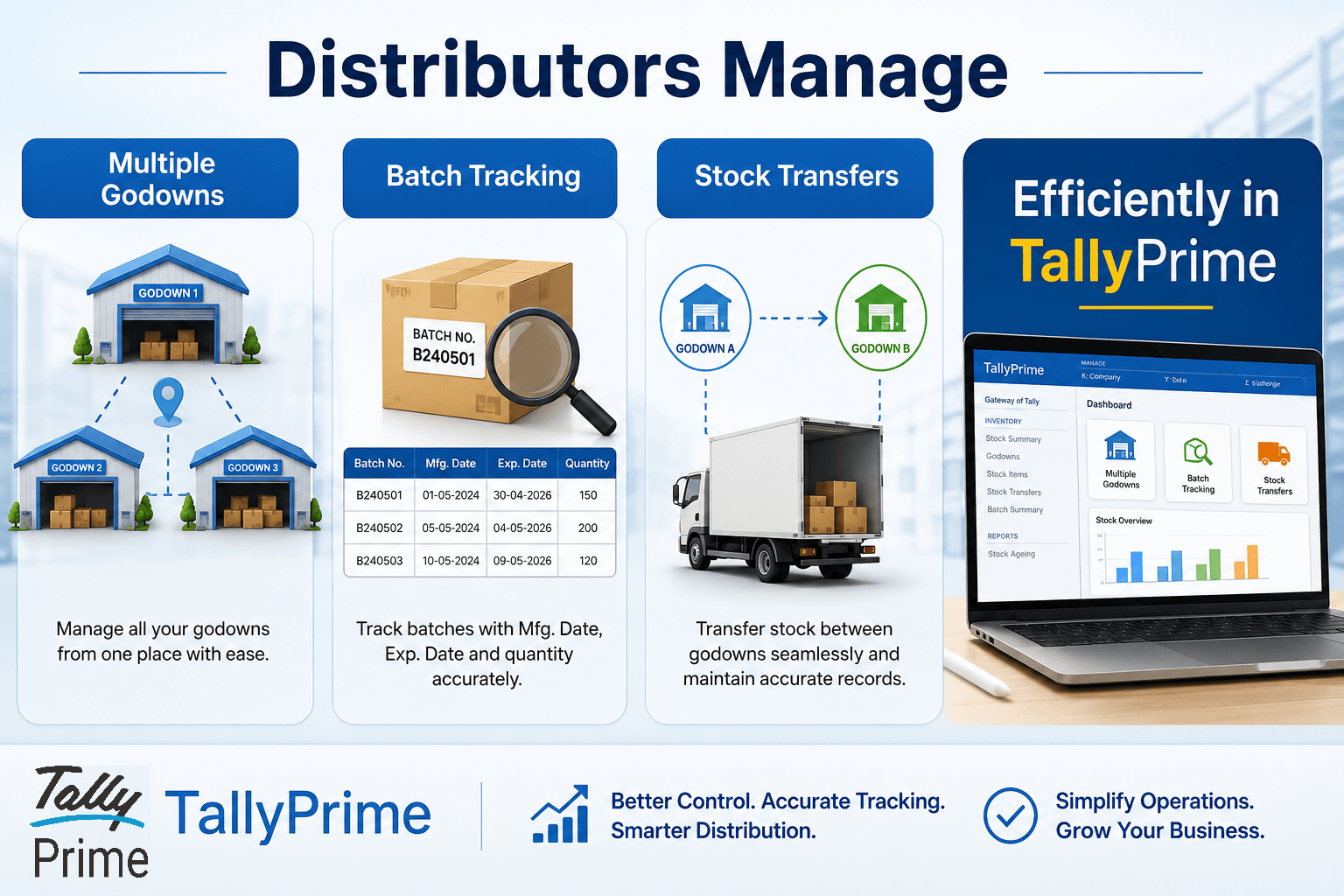
If your business stores inventory across multiple warehouses or godowns, manually tracking stock can lead to shortages, expiry losses, and inaccurate inventory records. With TallyPrime, distributors can create and manage multiple godowns/warehouses, track inventory batch-wise with manufacturing and expiry dates, monitor stock availability in each location, transfer stock between godowns with a complete audit trail, generate godown-wise and batch-wise stock reports instantly, reduce inventory errors and improve stock visibility
Introduction
Managing inventory across multiple locations can be challenging for distributors, especially when tracking stock batches and transferring goods between warehouses. With TallyPrime, distributors can efficiently manage multiple godowns, monitor batch-wise inventory, and record stock transfers with complete accuracy. This helps improve stock visibility, reduce errors, and ensure smooth inventory operations across the entire distribution network.
Aziz Pharma Distributors, a medicine wholesaler based in Bihar, had grown rapidly over the years. The company supplied medicines, surgical products, and healthcare items to more than 500 chemists and hospitals across the region.
As the business expanded, Aziz opened multiple storage locations:
- Main Warehouse (Bhagalpur)
- Secondary Godown (Patna)
- Cold Storage Godown (Bhagalpur)
Aziz was managing inventory using another software and facing a lot of problems. He did not know when specific stock was due to expire or the status of inventory at a particular location, because Aziz was suffering significant losses due to medicine expirations. As inventory volumes increased, problems started appearing every day.
One day, I met Aziz and discussed these issues. After reviewing the inventory process, I said:
"Your business has outgrown the current software. The biggest requirement for a pharmaceutical distributor is accurate godown-wise and batch-wise inventory management. You should consider using TallyPrime." Aziz was surprised.
He had always thought TallyPrime was only for accounting.
I explained that modern TallyPrime offers powerful inventory management features specifically useful for distributors.

After three months, Aziz told me:
"Earlier, we spent hours finding stock and tracking batches. Today, we know exactly which medicine is available in which godown, which batch is nearing expiry, and where stock is moving. TallyPrime has given us complete control over our inventory."
Why Is Godown-Wise Inventory Tracking Important for Distributors?
For distributors, managing inventory isn't just about knowing what you have in stock—it is equally about knowing exactly where it is located.
Godown-wise inventory tracking (or warehouse-level tracking) refers to the practice of monitoring stock levels, movements, and valuations across multiple distinct storage locations or godowns. For a distributor operating across regions or managing multiple facilities, this capability is a necessity for survival and profitability.
Here is why godown-wise inventory tracking is so critical for distributors:
Optimized Order Fulfillment & Faster Shipping
When an order comes in, a multi-location tracking system allows distributors to see which godown is closest to the customer and has the required stock.
- Proximity Shipping: Shipping from the nearest godown drastically reduces transit times and freight costs.
- Smart Allocation: If Godown A is out of stock but Godown B has a surplus, the system can automatically route the order or trigger an internal stock transfer, preventing lost sales.
Accurate Stock Valuation and Pricing
Inventory costs aren't always uniform. The cost of storing, handling, or acquiring goods can vary based on the godown's location (due to regional taxes, varying rent, or localized transport costs).
- Tracking inventory by godown allows distributors to apply precise valuation methods (like FIFO or LIFO) per location.
- It ensures that the Cost of Goods Sold (COGS) is accurately calculated, leading to better margin analysis and localized pricing strategies.
Efficient Internal Stock Transfers
Distributors frequently need to balance inventory between warehouses.
- Godown-wise tracking provides real-time visibility into "Stock in Transit."
- It ensures that when Goods A are moved from Godown 1 to Godown 2, they don't mysteriously disappear from the books during the journey, reducing administrative errors and shrinkage.
Reduced Shrinkage, Theft, and Wastage
When inventory is tracked generally across a whole company, it is incredibly easy for items to go missing without anyone noticing.
- Accountability: By segregating inventory data by godown, warehouse managers can be held strictly accountable for discrepancies during physical audits.
- Batch & Expiry Management: For distributors dealing with perishable goods, pharmaceuticals, or FMCG products, godown-level tracking helps monitor batch numbers and expiry dates locally. This ensures older stock is sold first (FIFO) before it expires.
How Does TallyPrime Create Multiple Godowns?
TallyPrime provides a built-in Godown/Location feature that enables businesses to create unlimited storage locations.
Navigation
Gateway of Tally → Chart of Accounts → Inventory Masters → Godowns → Multi-Masters (Alt+H) → Multi Create
Create locations such as:
- Central Warehouse
- Delhi Depot
- Mumbai Branch
- Chennai Distribution Centre
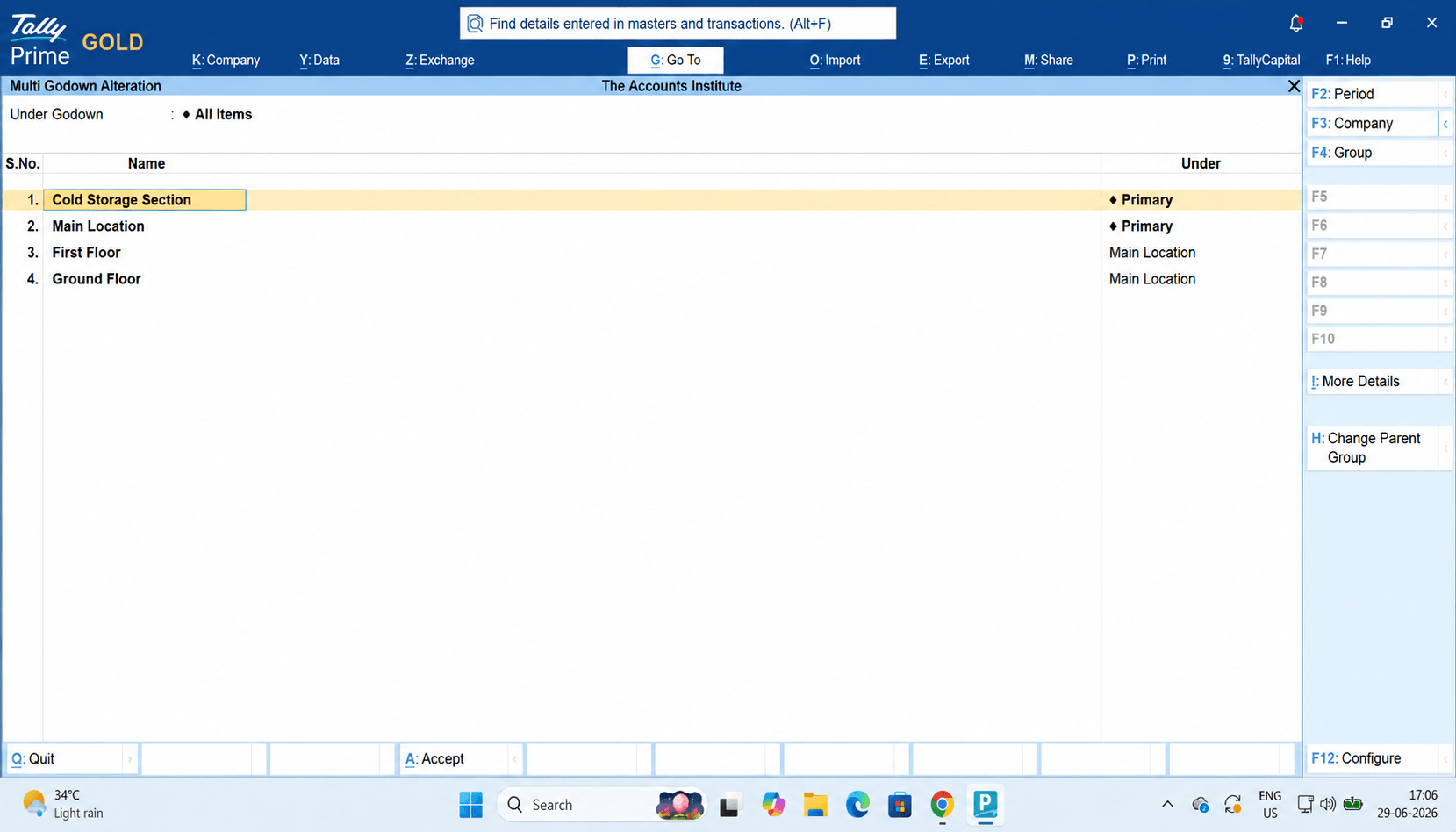
You can even create:
Hierarchical Godowns
Central Warehouse
- Ground Floor
- First Floor
- Cold Storage Section
This helps in managing large warehouse structures.
How You Can Track Stock Batch-Wise in TallyPrime?
Tracking stock batch-wise in TallyPrime is incredibly straightforward once you know where to flip the switches. It essentially boils down to a three-step workflow: enabling the feature company-wide, configuring your specific items, and then logging your batches during daily transactions.
Here is the exact step-by-step method to get it running smoothly.
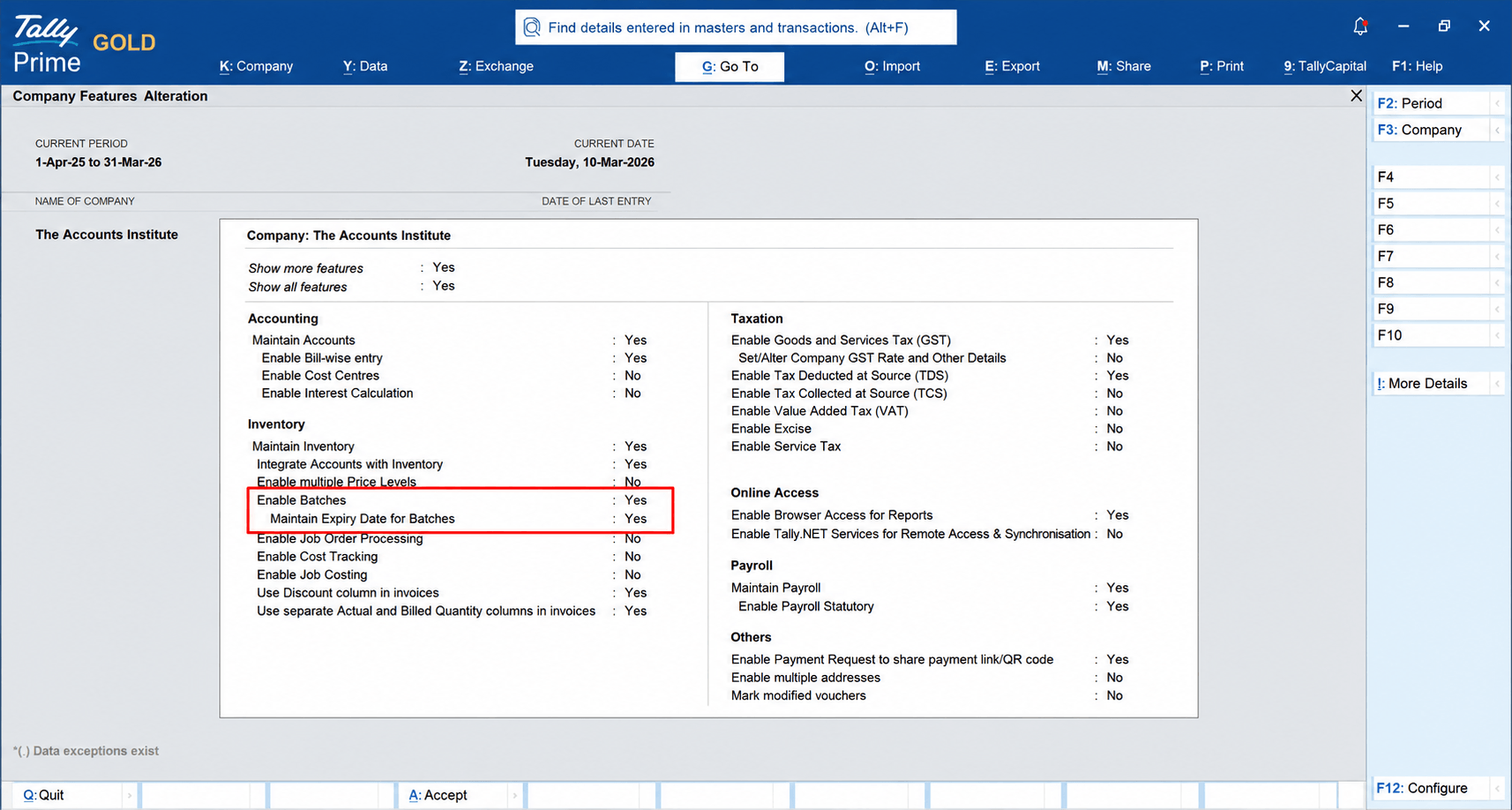
Step 1: Enable Batches in Company Features
First, you need to tell TallyPrime that your business requires batch tracking.
- Go to the Gateway of Tally and press F11 (Features).
- Under the Inventory column, find Enable Batches and set it to Yes.
- If you deal with perishable goods, pharma, or food, set Maintain Expiry Dates for Batches to Yes right below it.
- Press Ctrl + A to save and exit.
Step 2: Create Stock Items
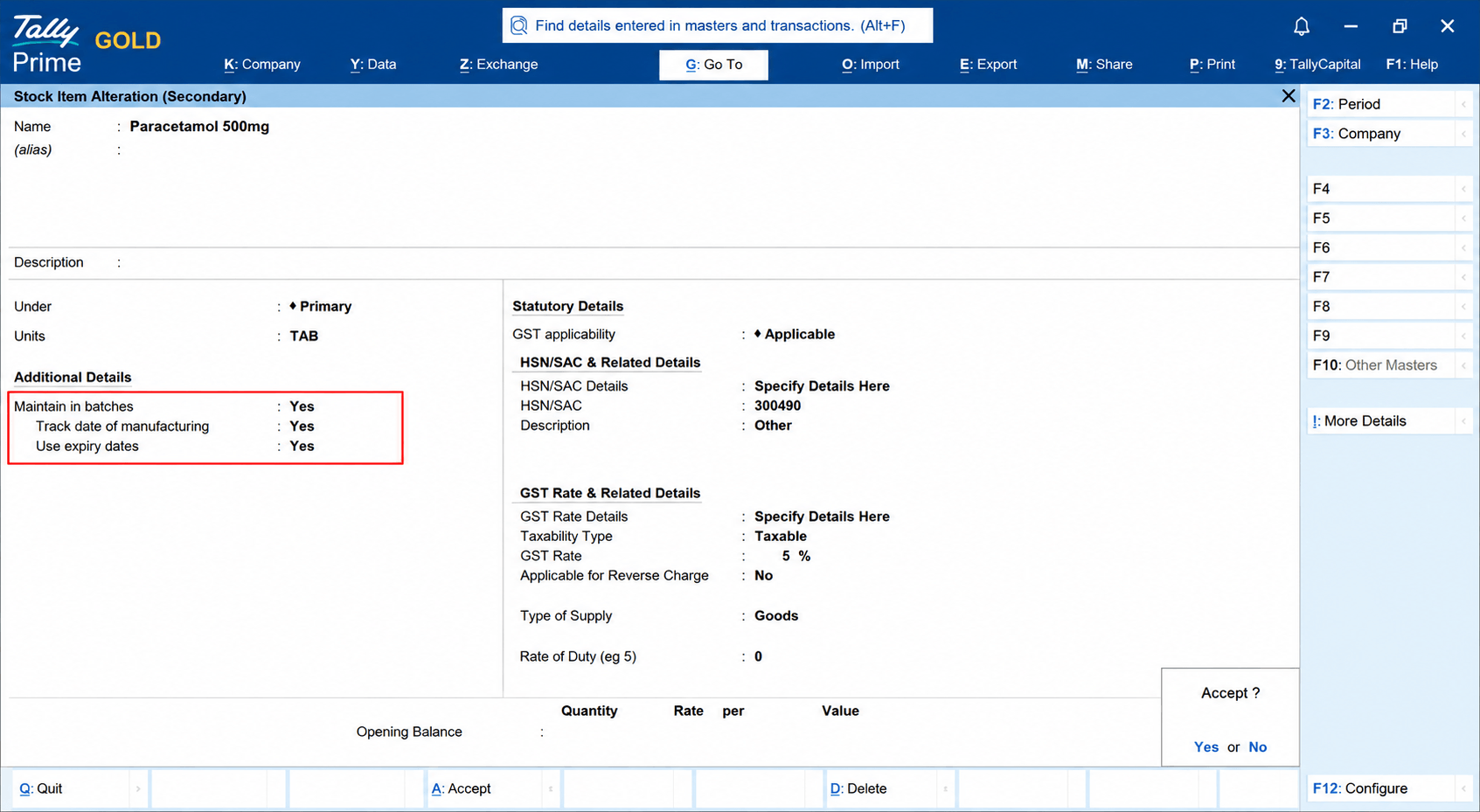
Here’s how you can create stock items in TallyPrime:
Go to:
Gateway of Tally → Create → Inventory Masters → Stock Item
Example:
Stock Item: Paracetamol 500mg, Unit: Tablets
Gateway of Tally → Create → Inventory Masters → Units
When inventory is received, TallyPrime will ask for:
Batch Number
Manufacturing Date
Expiry Date
How Does Batch Tracking Work During Purchases?
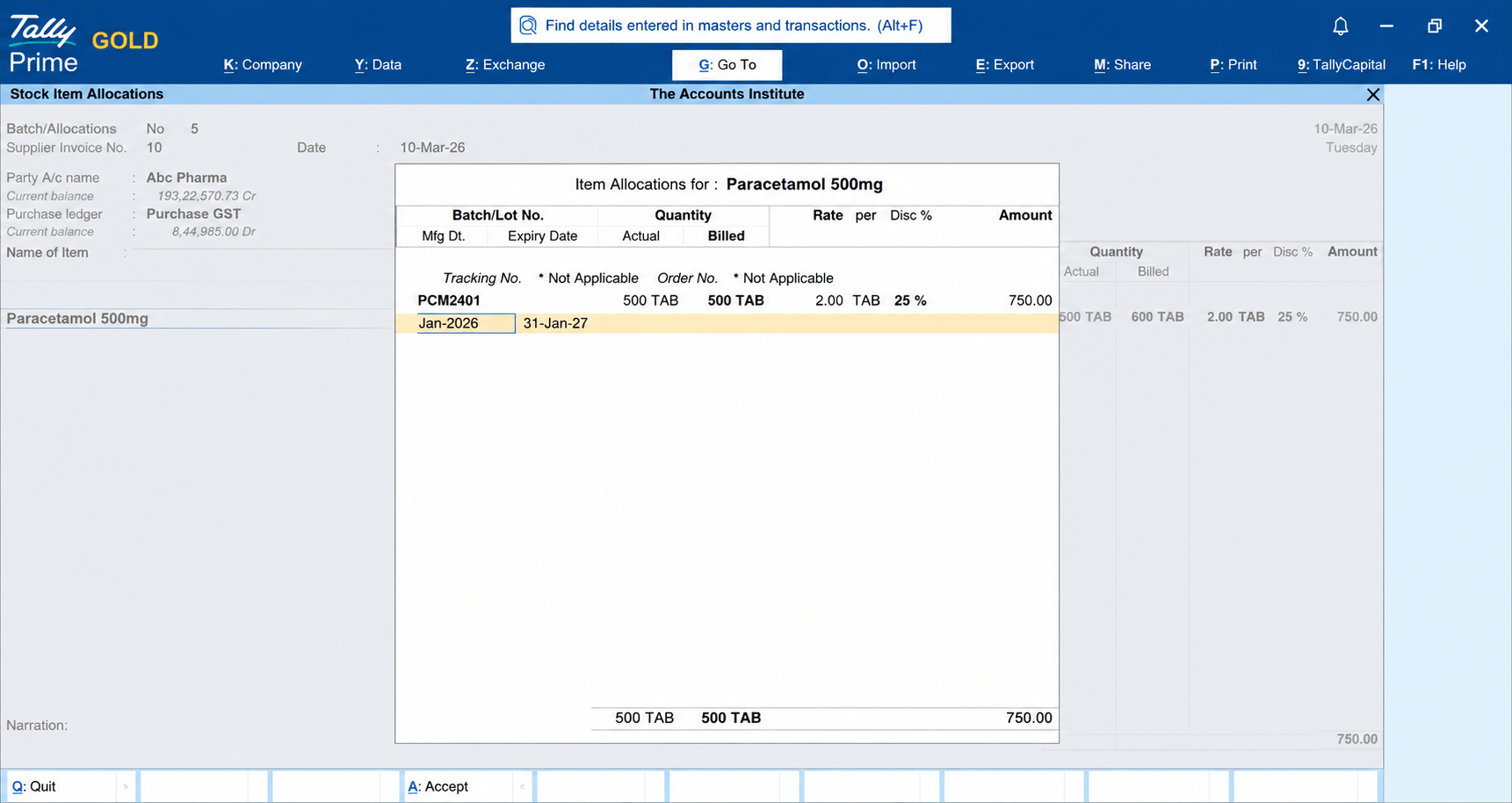
In TallyPrime, batch tracking during purchases works by allowing users to record batch numbers, manufacturing dates, expiry dates, and quantities while entering purchase transactions, ensuring that each batch of inventory is uniquely identified and can be tracked throughout its lifecycle for accurate stock management, traceability, and expiry control.Suppose a distributor purchases medicine inventory.
Purchase Example:
Item Quantity
Paracetamol 500mg 1000Tab
Batch Details:
Batch No. Qty. Expiry
PCM2401 500 Jan 27
During Purchase Entry:
TallyPrime records:
Batch Number, Quantity, Expiry Date, Godown Location.
This creates complete inventory traceability.
How Can Stock Be Transferred Between Godowns?
Inventory often needs movement between locations.
Examples:
Head Office → Branch
Warehouse A → Warehouse B
Store → Transit Stock
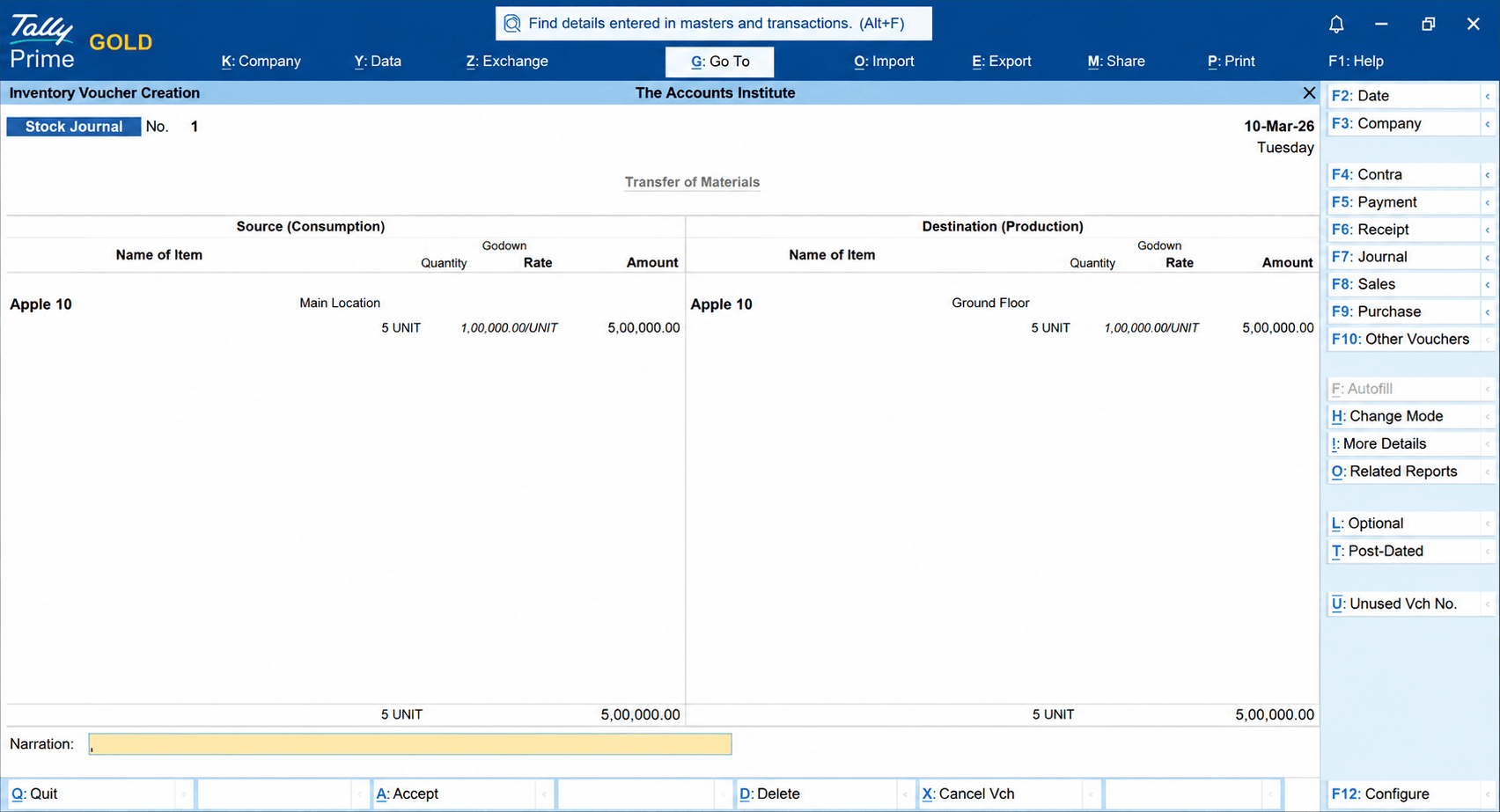
TallyPrime uses Stock Journal Voucher for such transfers.
Here’s how you can transfer stock between godowns:
Step 1:
Navigation
Gateway of Tally → Vouchers → Others Voucher → Stock Journal
✔ Reduces stock from source location
✔ Increases stock in destination location
✔ Maintains batch details
✔ Preserves audit history
Step 2:
Pass entry for Transfer of Material from Source to Destination.
How Does TallyPrime Maintain an Audit Trail for Stock Transfers?
In TallyPrime, an internal inventory movement, such as shifting stock between warehouses using a Stock Journal, is treated with the same level of security and tracking as a financial sales invoice.
TallyPrime maintains an airtight audit trail for stock transfers primarily through its built-in Edit Log architecture.
How Can You Generate Godown-Wise Stock Reports?
One of the biggest advantages of TallyPrime is reporting flexibility.
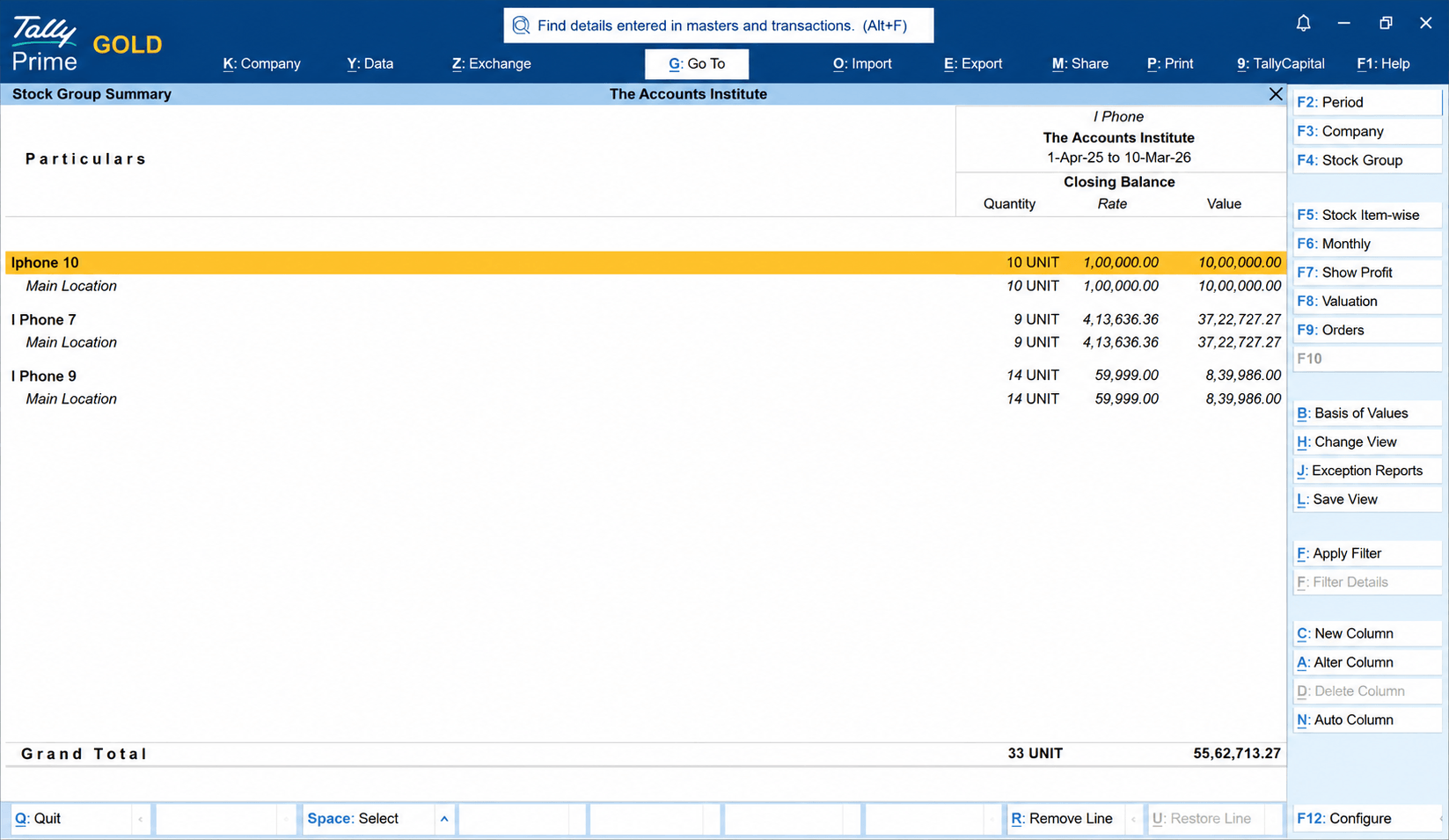
In TallyPrime, you can generate a Godown-wise Stock Report by navigating to Display More Reports → Inventory Books → Godown Summary, where you can view the stock available in each godown along with item-wise quantities, helping you monitor inventory across multiple storage locations efficiently.
Navigation
Display More Reports → Inventory Books → Stock Summary
Press:Alt+F5 (Detailed)
Select:
Godown-Wise View
How Can You Generate Batch-Wise Stock Reports?
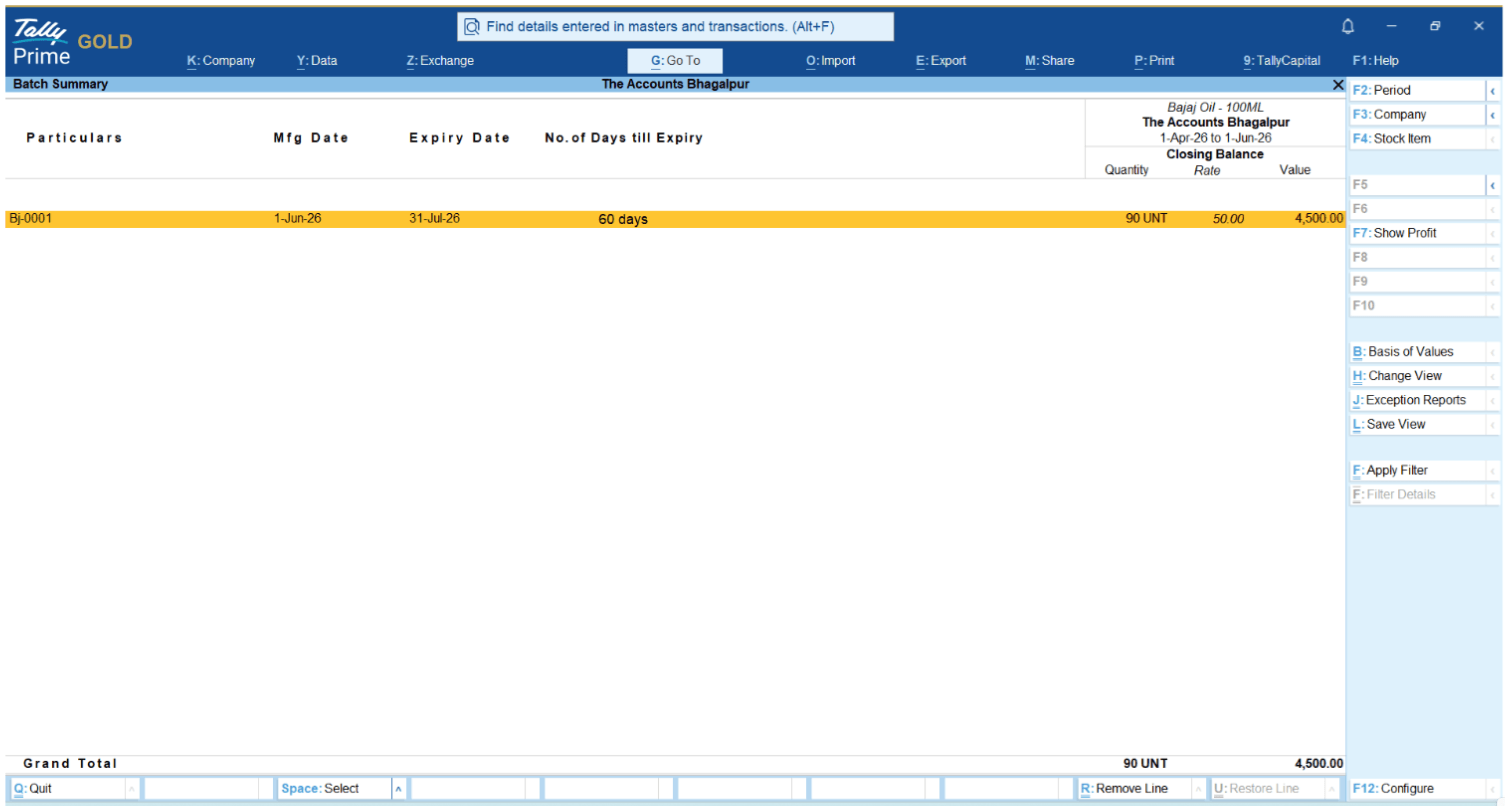
To generate a Batch-Wise Stock Report in TallyPrime, open Item Batch Summary and select the required stock item. Then, press F12 (Configure) and enable Show Batches or drill down to view batch details. TallyPrime will display the quantity available in each batch along with batch numbers, manufacturing dates, expiry dates (if applicable), and stock movement details, helping businesses track inventory accurately and manage batch-specific stock efficiently.
Batch-wise reporting helps businesses monitor inventory by lot number.
Navigation
Gateway of Tally → Alt+G → Item Batch Summary → Select Stock Item
View:
Batch Number
Quantity
Expiry Date
Conclusion
For distributors managing inventory across multiple locations, visibility and control are essential. TallyPrime's Godown-Wise Inventory and Batch Tracking capabilities help businesses accurately monitor stock levels, manage expiry-sensitive inventory, transfer stock between warehouses with a complete audit trail, and generate detailed reports for smarter decision-making.
Quick Implementation Checklist
- Enable Multiple Godowns
- Enable Batch-Wise Inventory
- Record Manufacturing & Expiry Dates
- Create Location-Wise Warehouses
- Use Stock Journal for Transfers
- Review Godown-Wise Reports Regularly
- Monitor Near-Expiry Inventory
- Audit Batch Movement Periodically
Businesses that implement these practices can significantly improve inventory accuracy, reduce wastage, and streamline warehouse operations.