₹1,500 Discount on Combo Course
Grab Now Apply "FLAG26"
A Trader's Walkthrough: Managing Inventory Across Locations in TallyPrime
30-Second Summary
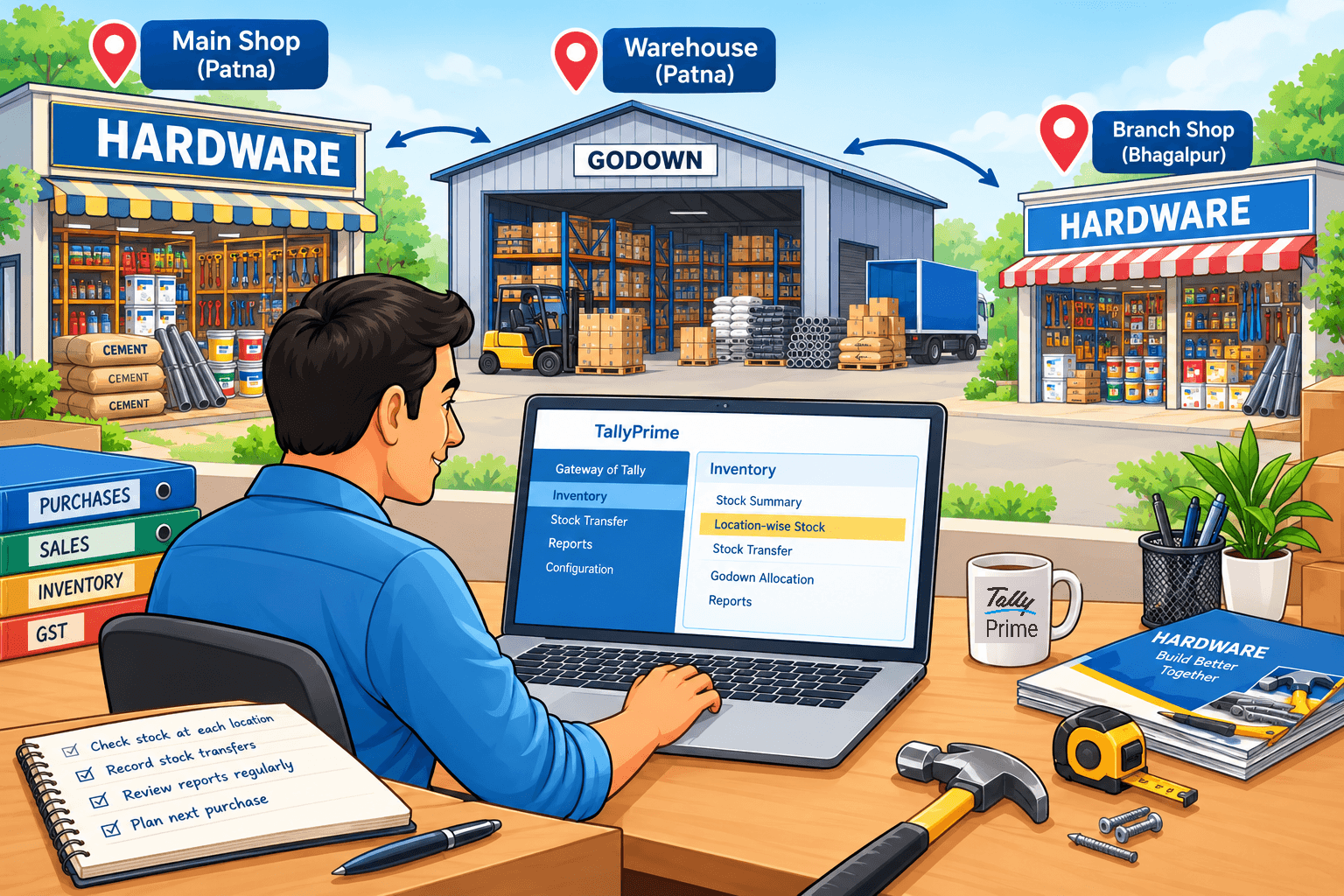
Managing stock across multiple shops, warehouses, or godowns becomes difficult when every location maintains separate records. TallyPrime helps traders keep location-wise stock records, track stock movements between locations, and understand where inventory is available. Instead of depending on phone calls or spreadsheets, business owners can check stock positions from their accounting system. The key is to set up each location properly, record stock transfers consistently, and review location-wise reports regularly.
Introduction
Trying to keep track of your stock when you have more than one godown, shop, or warehouse can feel like chasing shadows. You think an item is on the main shop shelf, but a customer asks for it, and it's actually stuck across town in storage.
I’ve seen many growing businesses struggle with this exact problem. When your trade expands to multiple spots, keeping your stock numbers straight becomes the difference between a happy customer and a lost sale.
Why Does Managing Stock Across Places Get So Messy?
In my experience working with traders, the biggest headache isn't selling goods—it's knowing which location holds what.
When you rely on manual notes or a single combined stock total, you invite errors. You might end up buying stock you already have simply because it's sitting in a secondary godown and you forgot about it. Clear visibility across every corner of your business changes everything. It stops money from sitting idle where it isn't needed.
TallyPrime has all the related features through which the trader can know the correct count of stock items in each of his locations.
Let's understand how a trader manages inventory across different locations easily and keeps the business running without the guesswork.
How Can You Track Stock Separately Without Losing Your Mind?
The secret is setting up dedicated locations or "godowns" in your software. Think of each shop, warehouse, or even a delivery van as a separate mini-store on paper.
When you buy items, you record exactly which godown they enter. When you sell, you pick the exact spot the item leaves. This way, your main dashboard always shows an accurate, real-world picture. You don't have to guess if your downtown branch has enough boxes left for the weekend rush—you can check it in seconds.
"Knowing your exact stock location isn't just about counting items; it's about removing the daily panic of missing inventory."
What Happens When Goods Need to Move Between Locations?
Stock transfers happen all the time. Maybe your retail outlet ran out of a popular shirt, and your main warehouse has plenty.
Instead of treating this like a confusing sale and a new purchase, use a proper stock transfer entry. This records the journey clearly: it shows items leaving Location A and arriving safely at Location B. Keeping this paper trail clean means your accountant won't pull their hair out at the end of the month trying to figure out why stock counts don't match.
How to Set Up Different Locations in TallyPrime?
The first step is to represent your physical storage locations properly in TallyPrime.
For example, imagine a hardware trader has:
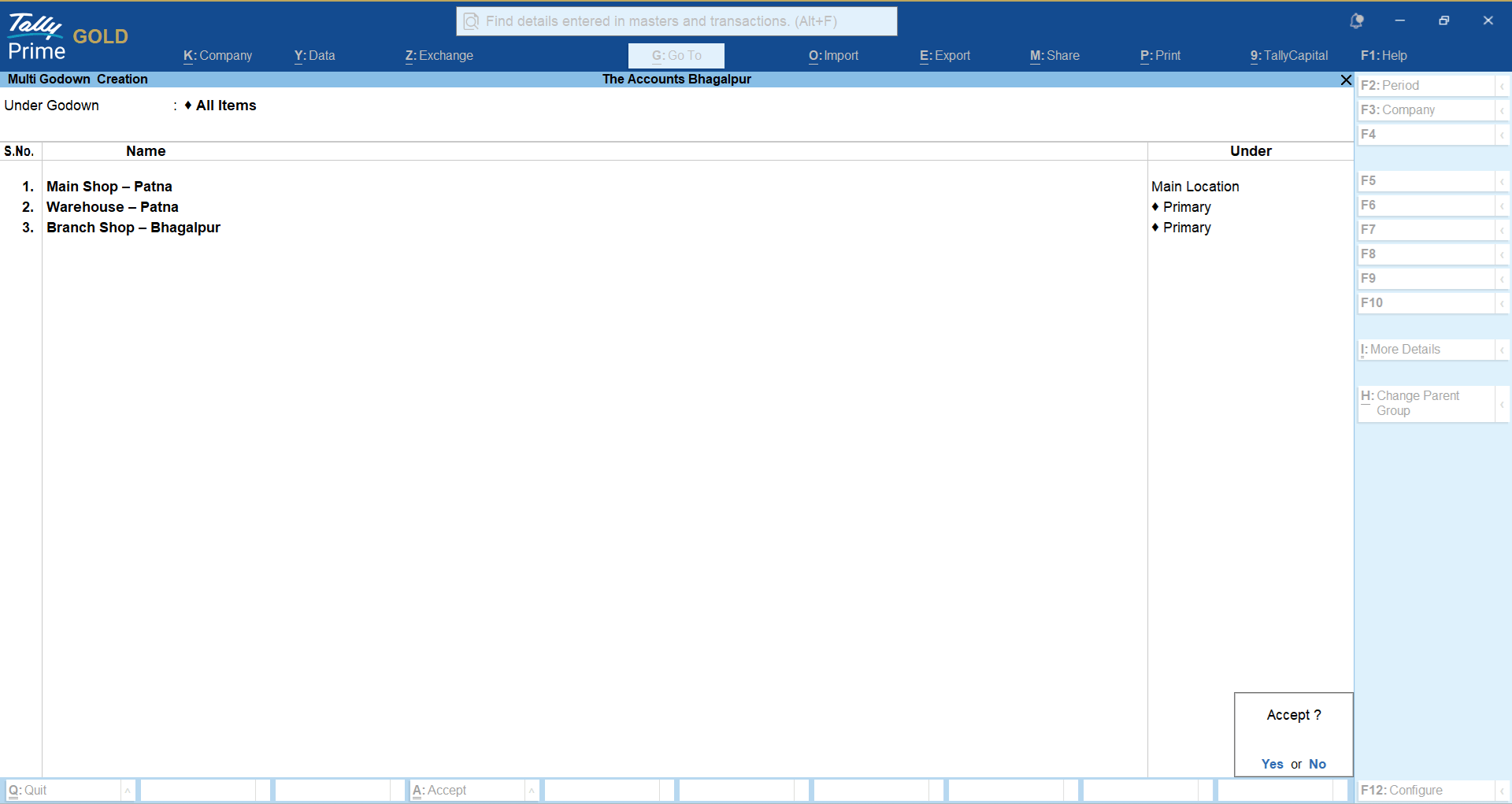
● Main Shop – Patna
● Warehouse – Patna
● Branch Shop – Bhagalpur
Each location can be maintained as a separate Godown/Location.
Gateway of Tally→ CHart of Accounts→ Godowns→ Multi Masters→ Multi Create
Why Is Location-Wise Stock Better Than One Combined Stock Figure?
Suppose TallyPrime shows that you have 500 pieces of PVC pipe.
That sounds useful, but it doesn't answer the most important question:
Where are those 500 pieces?
Now imagine the actual position is:
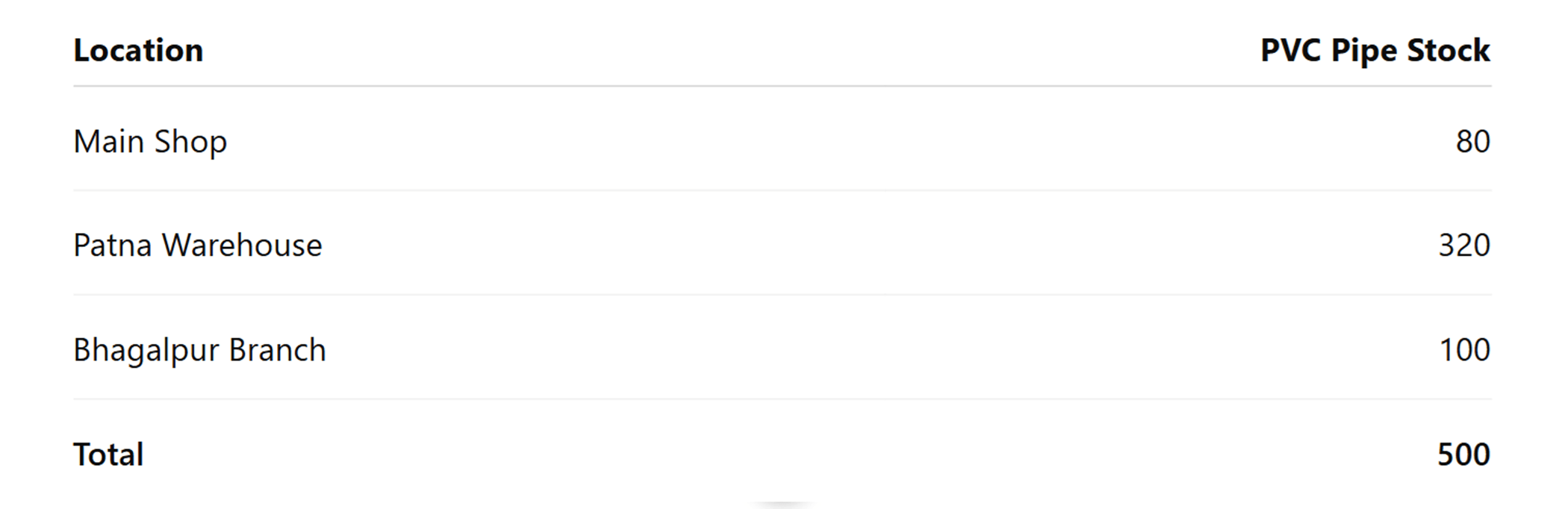
The total quantity is the same, but the second view is much more useful.
The owner immediately knows where the stock is available.
This becomes particularly important when a customer calls asking for urgent delivery.
Instead of calling every branch, the owner can check the stock position and decide where the order should be fulfilled from.
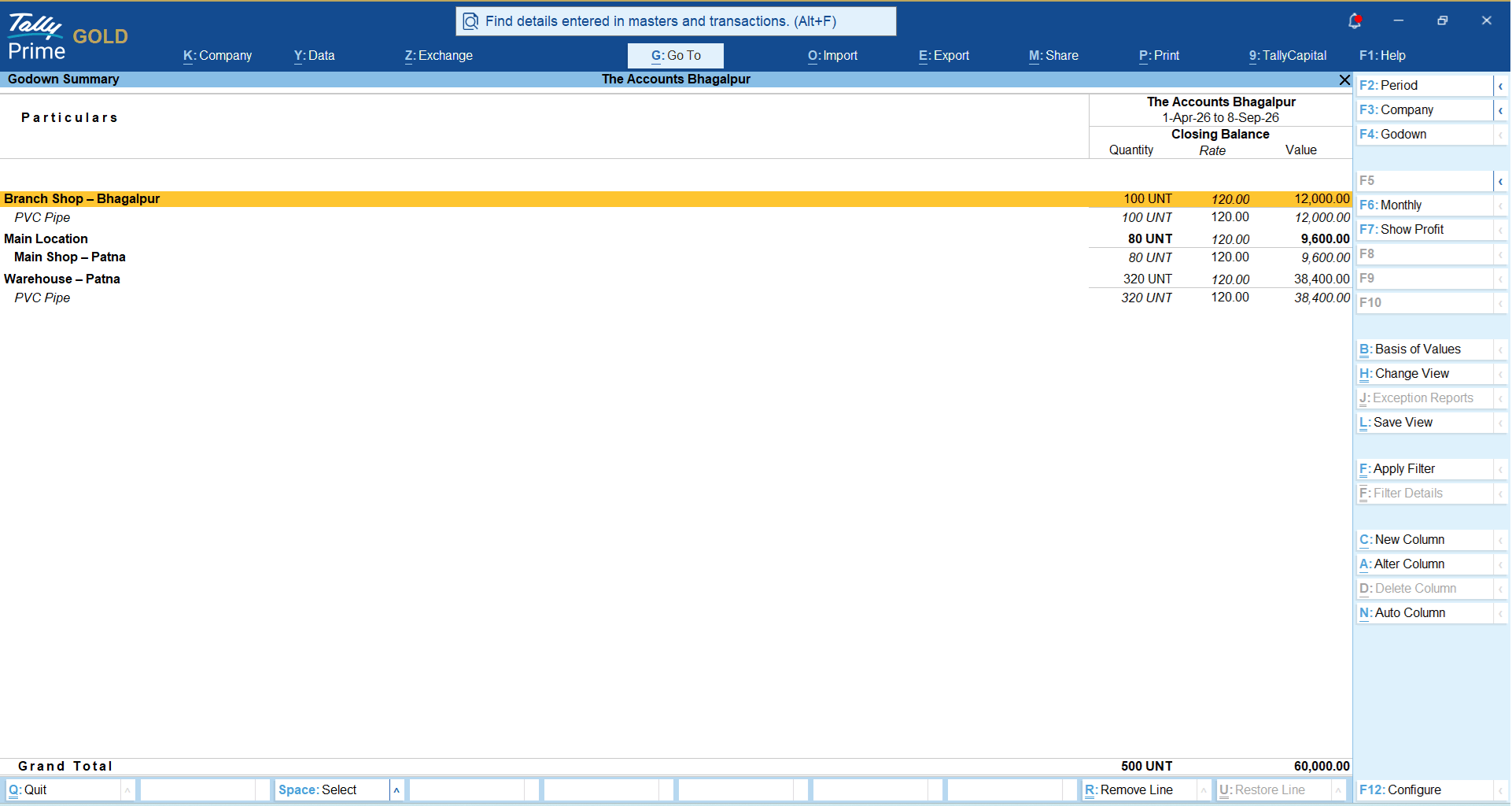
You can track the stock in accordance with location wise in TallyPrime:
Gateway of Tally→ Display More Reports→Inventory Books→ Godowns
How to Move Stock From One Location to Another?
Stock transfers are common in trading businesses.
For example:
A hardware distributor receives 320 PVC pipes at the Patna warehouse.
The Bhagalpur branch needs 120 PVC Pipes.
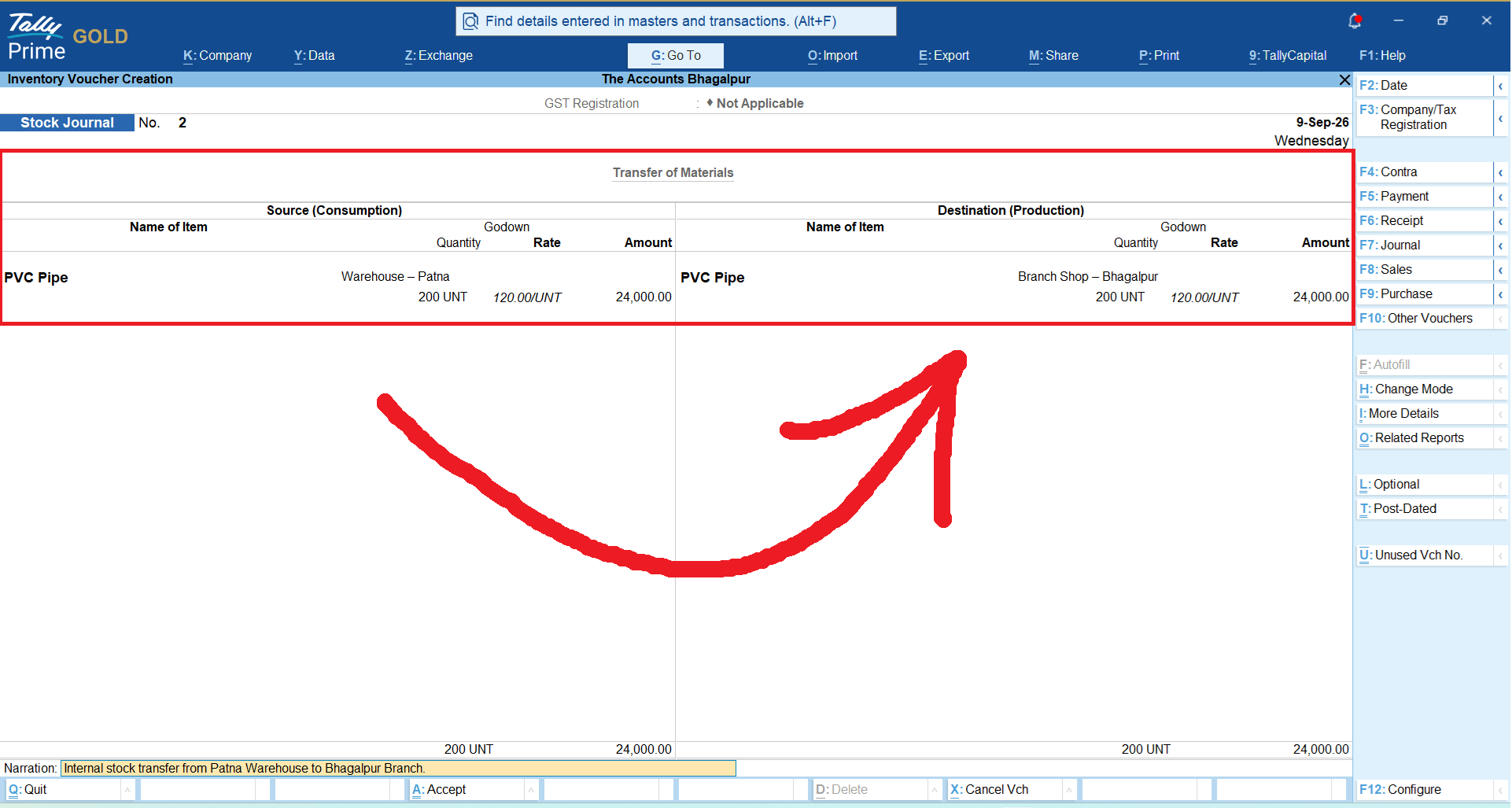
Instead of treating this as a sale and purchase, the business can record the movement as an internal stock transfer.
The movement becomes:
Patna Warehouse → Bhagalpur Branch
The overall business still owns the same 200 PVC Pipes, but the location-wise quantity changes.
After transferring 120:
Patna Warehouse: 200
Bhagalpur Branch: 120
Just follow the stepGateway of Tally→ Vouchers→Stock Journal (Alt+F7)
A Real-World Example: How Rohan Solved His Godown Puzzle
Take Rohan at Bhagalpur, Bihar, a client of mine who runs a wholesale and retail business supplying electrical fittings. He started with one small shop, but soon opened two extra storage godowns to handle bulk purchases.
At first, Rohan tried managing everything in a single notebook list. Within months, chaos struck. His retail team promised items to a builder, only to find out the items were locked away in a distant godown.
We helped him set up distinct location profiles in TallyPrime. Now, whenever stock arrives from a manufacturer, his team tags the specific godown right away. When goods move between the warehouse and the shop, a quick transfer entry logs the shift. Rohan tells me he saves hours every week and hasn't lost a single customer to stock confusion since.
Quick Takeaways for Multi-Location Success
Take Rohan at Bhagalpur, Bihar, a client of mine who runs a wholesale and retail business supplying electrical fittings. He started with one small shop, but soon opened two extra storage godowns to handle bulk purchases.
At first, Rohan tried managing everything in a single notebook list. Within months, chaos struck. His retail team promised items to a builder, only to find out the items were locked away in a distant godown.
We helped him set up distinct location profiles in TallyPrime. Now, whenever stock arrives from a manufacturer, his team tags the specific godown right away. When goods move between the warehouse and the shop, a quick transfer entry logs the shift. Rohan tells me he saves hours every week and hasn't lost a single customer to stock confusion since.
- Define your spots: Create separate profiles for every physical space you use to store goods, even a small backroom.
- Log movements immediately: Never move physical stock without recording the transfer in your system right away.
- Run regular checks: Compare your software counts with actual physical stock at each location once a month to catch discrepancies early.
Frequently Asked Questions
1. Can I track stock across more than two locations?
Yes, you can create as many locations or godowns as your business needs, whether it's three warehouses or ten delivery vans.
2. Is it hard to set up new godowns?
Not at all. You can add a new location name into your inventory masters in just a few clicks whenever you expand.
3. How do I record items moving from my warehouse to my shop?
You use a stock journal or transfer entry, which clearly moves the quantity from one location name to another without affecting your sales totals.
4. Can I see a report for just one specific location?
Yes, stock summaries can be filtered by location so you can view the exact inventory value and quantity for a single shop or warehouse.
5. Does multi-location tracking help with reordering stock?
Definitely. Knowing stock levels per location helps you see which specific branch is running low so you only reorder what is genuinely needed there.